
The best AI agents for developers in 2026 offer advanced capabilities ranging from intelligent code completion to autonomous project execution. Top contenders include Cursor for integrated development environments, Claude Code for terminal-native autonomy, and OpenAI Codex with GPT-5.5 for comprehensive workflow assistance. Other notable agents are Aider for open-source flexibility, GitHub Copilot for established assistance, Devin for autonomous engineering, and SWE-Agent for specialized problem resolution.
In 2026, top AI agents for developers span IDEs, terminal, and full autonomy. Cursor, Claude Code (Opus 4.7), and OpenAI (GPT-5.5) lead, offering integrated code review, complex task execution, and polished e2e workflows. Open-source Aider, GitHub Copilot, autonomous Devin, and bug-fixing SWE-Agent provide diverse solutions. Orchestration frameworks like LangGraph and cloud platforms like AWS Bedrock support custom agent builds, while cost management and security remain critical for integration.
Best AI Agents for Developers in 2026: The Ultimate Guide
The best AI agents for developers in 2026 offer a spectrum of capabilities, from intelligent code completion and refactoring to autonomous task execution and entire software development orchestration. Top choices like Cursor, Claude Code, and OpenAI Codex powered by GPT-5.5 excel in different scenarios, prioritizing either integrated developer environments, terminal-based autonomy, or open-source flexibility. Developers can leverage these tools to enhance productivity, automate repetitive tasks, and tackle complex problems more efficiently.
What Are AI Agents for Developers?
AI agents are autonomous entities that perceive their environment, make decisions, and take actions to achieve specific goals. For developers, this means agents that interact with codebases, tools, and systems to automate tasks across the software development life cycle (SDLC).
Coding agents specifically assist or automate development tasks like code generation, debugging, testing, and refactoring. They leverage large language models (LLMs) as their core intelligence, using prompt engineering to guide their actions toward desired outcomes. This integration of LLMs with developer tools is transforming how software is built.
Autonomous agents operate independently without constant human intervention, while multi-agent systems involve multiple intelligent agents cooperating to achieve common goals. The 2026 landscape shows these technologies maturing from simple assistants to full workflow orchestrators, providing significant efficiency gains.
Top 7 AI Agents for Developers in 2026
1. Cursor: The Integrated Development Environment
Cursor combines an editor-like interface, CLI, and cloud agent API specifically designed for developer workflows. It excels at automated code review, bug fixing, and maintaining CI hygiene through real actions in code and infrastructure.
Key features include multi-file editing across projects, intelligent refactoring suggestions, and team collaboration tools. The agent can automatically create pull requests for fixes, run tests, and deploy code changes when properly configured. This makes it an invaluable asset for continuous integration and continuous deployment pipelines.
Pricing ranges from $20-60/month as of May 2026, positioning it as an affordable professional tool. Cursor supports various LLMs including their own optimized models and Claude Opus 4.7 integration.
Best for: Development teams needing integrated code review automation and CI/CD maintenance.
2. Claude Code with Opus 4.7: Terminal-First Autonomy
Claude Code has emerged as the leading solution for terminal-native development and complex autonomous tasks. The Opus 4.7 model specifically dominates Reddit discussions (r/programming, r/ChatGPT) for complex reasoning and multi-step architecture problems.
Its strengths include natural language understanding of development tasks, ability to work across multiple files and repositories, and sophisticated error diagnosis. The agent can autonomously execute terminal commands, run tests, and implement complex feature requests, making it ideal for developers comfortable with command-line interactions.
Pricing ranges from $20-100/month depending on usage intensity. The higher tiers provide priority access to the most powerful models and increased rate limits.
Best for: Developers preferring terminal workflows and needing autonomous complex task execution.
3. OpenAI Codex with GPT-5.5: Best Overall Workflow
OpenAI’s Codex powered by GPT-5.5 provides what many consider the best overall coding-agent workflow in 2026. The integration between code generation, understanding, and execution has reached unprecedented smoothness, building on previous iterations like GPT-5.5 Instant.
The system excels at understanding context across multiple files, generating syntactically correct code in numerous languages, and providing intelligent suggestions for optimization. Its error recovery capabilities and ability to learn from codebase patterns make it particularly valuable for large projects. This comprehensive approach simplifies complex development tasks.
Access is primarily through OpenAI’s API with consumption-based pricing, though enterprise plans offer predictable billing. The Assistants API provides specific tools for building custom agent implementations, integrating seamlessly with other OpenAI services such as GPT-5.5 and GPT-5.5 Instant.
Best for: Developers seeking the most polished end-to-end coding assistance across diverse languages and frameworks.
4. Aider: Open-Source Flexibility Champion
Aider stands out as the strongest all-around open-source coding agent in 2026. It supports multi-file editing, Git integration, and works with any LLM, providing exceptional flexibility for developers with specific requirements.
The tool operates primarily through command-line interface but integrates well with popular IDEs. Its chat-based interface allows natural language conversation about code changes while maintaining full version control visibility through Git integration. This makes it a powerful collaborative tool for teams.
Being open-source, Aider is free to use but requires operational costs for self-hosting and governance. This makes it particularly attractive for organizations needing centralized control over their AI development tools and data, especially when considering the implications of AI copyright infringement.
Best for: Teams requiring open-source solutions with full control over model selection and data governance.
5. GitHub Copilot: The Established Standard
GitHub Copilot remains a dominant force in AI-assisted development, though it has evolved from simple code completion to more agentic capabilities. The 2026 version includes better context understanding, improved multi-file awareness, and deeper integration with GitHub’s ecosystem, as detailed in guides for best AI coding tools.
Copilot now offers automated code review suggestions, dependency vulnerability detection, and test generation. Its tight integration with Visual Studio Code, JetBrains IDEs, and other popular development environments makes it accessible to millions of developers, streamlining their workflows.
Pricing starts at $10/month for individuals with team and enterprise plans available. The recent GitHub Copilot Workspace addition provides more autonomous agent capabilities for project-level tasks, extending its utility beyond basic code suggestions.
Best for: Developers already invested in the GitHub ecosystem who want seamless AI assistance.
6. Devin (Cognition AI): The Autonomous Engineer
Devin represents the frontier of autonomous AI software engineering, capable of handling entire development projects end-to-end. Unlike assistants that respond to specific prompts, Devin can take high-level requirements and deliver complete solutions, pushing boundaries similar to what is seen with Familiar Robot in companion AI.
The agent can plan project architecture, write code across multiple files, set up infrastructure, debug issues, and deploy applications. It’s particularly effective for greenfield projects and prototyping where it can demonstrate full-stack development capabilities, significantly accelerating project timelines.
Pricing is enterprise-focused with custom quotes based on usage scope. Cognition AI positions Devin as a complementary team member rather than just a tool, emphasizing its role in augmenting human developer capacity.
Best for: Organizations seeking fully autonomous software development for specific projects or prototyping.
7. SWE-Agent: Specialized Problem Resolution
SWE-Agent specializes in resolving issues in software repositories, focusing particularly on debugging and bug fixing. It’s designed to work with existing codebases, identify problems, and implement tested solutions.
The agent excels at understanding error reports, reproducing issues, and creating minimal reproducible examples. It then develops and tests fixes before proposing changes through pull requests or direct commits when authorized, significantly speeding up maintenance cycles.
Available as both open-source software and hosted service, SWE-Agent provides flexible deployment options. Its specialized focus makes it particularly effective for maintenance tasks on mature codebases, providing reliable issue resolution.
Best for: Development teams needing specialized assistance with bug resolution and code maintenance.
Top AI Agents for Developers: Feature Comparison (2026)
Understanding the key differences between leading AI agents is crucial for making an informed decision. This comparison highlights their primary use cases, autonomy levels, key features, and more.
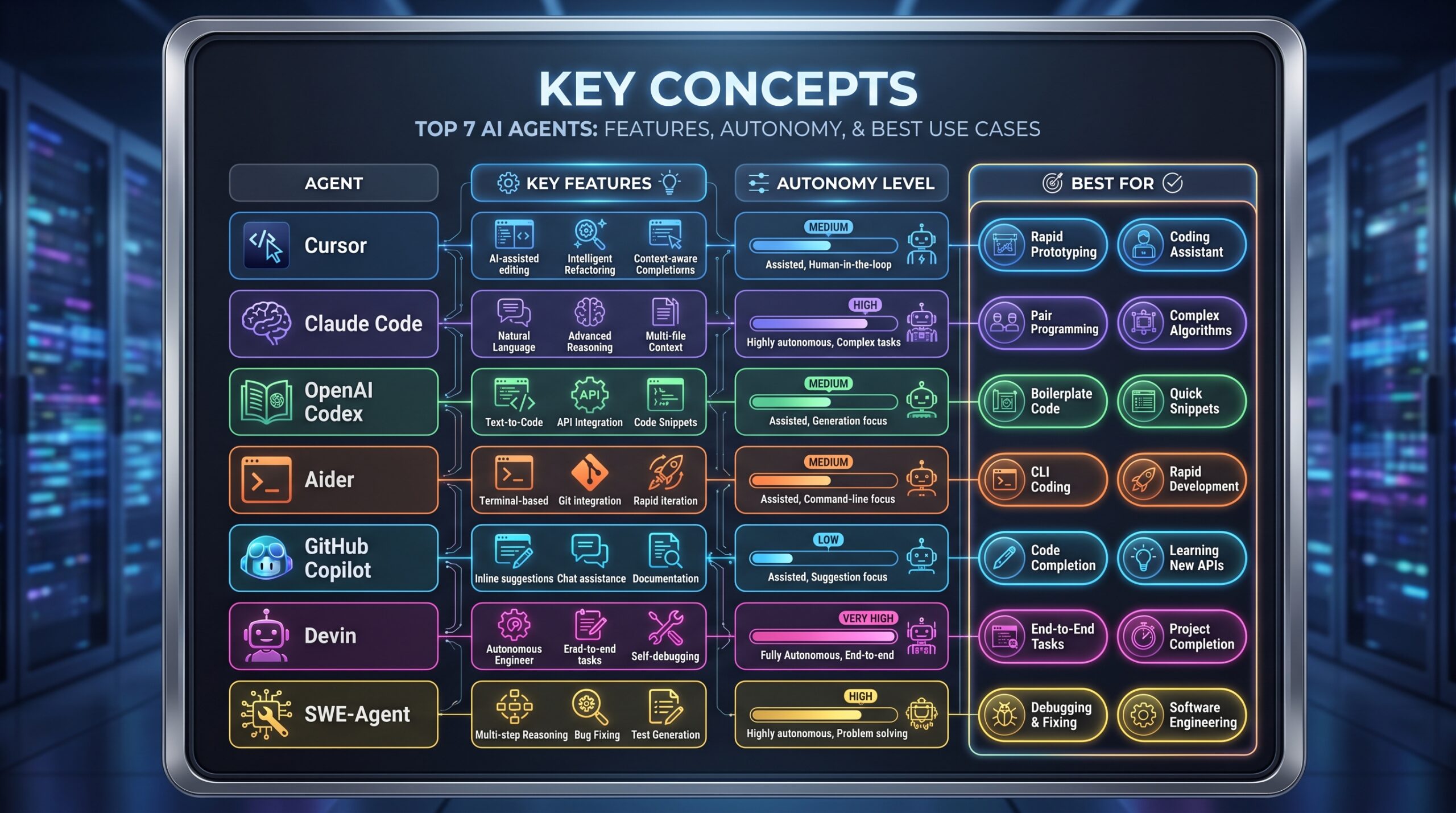
| Agent Name | Primary Use Case | Autonomy Level | Key Features | Language Support | IDE Integrations | Pricing Model | Best For |
|---|---|---|---|---|---|---|---|
| Cursor | Code review, bug fixing, CI hygiene | High automation with human oversight | Multi-file editing, automated PRs, test execution | 50+ languages | Native editor, VS Code, JetBrains | $20-60/month | Teams needing integrated automation |
| Claude Code | Complex autonomous tasks, terminal dev | High autonomy | Terminal command execution, complex reasoning | 30+ languages | Terminal-focused, some IDE plugins | $20-100/month | Terminal-centric developers |
| OpenAI Codex | General coding workflow | Medium-high autonomy | Context understanding, error recovery | 40+ languages | Extensive API integrations | Consumption-based | Polished end-to-end assistance |
| Aider | Open-source coding assistance | Medium autonomy | Git integration, any LLM support | 25+ languages | CLI, VS Code extension | Free (self-hosted) | Open-source flexibility needs |
| GitHub Copilot | Code completion, review | Medium autonomy | Ecosystem integration, vulnerability detection | 30+ languages | VS Code, JetBrains, Visual Studio | $10+/month | GitHub ecosystem users |
| Devin | End-to-end project development | Full autonomy | Project planning, full-stack development | 15+ languages | Web interface, API | Enterprise pricing | Autonomous project development |
| SWE-Agent | Bug resolution, maintenance | Medium autonomy | Issue reproduction, fix testing | 20+ languages | CLI, web interface | Open-source/Enterprise | Specialized bug fixing |
AI Agent Orchestration Frameworks: A Developer’s Choice
Building custom AI agent solutions requires robust frameworks for orchestrating multi-agent systems. These tools provide the infrastructure for creating, managing, and deploying AI agents at scale, enabling complex workflows like those explored in crypto trading bots.
| Framework | Type (Library/Platform) | Key Capabilities | Learning Curve | Community Support | Common Use Cases |
|---|---|---|---|---|---|
| LangGraph | Library | State management, cycle detection | Moderate | Strong (backed by LangChain) | Complex agent workflows, cyclical tasks |
| CrewAI | Library | Role-based agents, task delegation | Moderate | Growing rapidly | Multi-agent collaboration, project management |
| AutoGen | Library | Multi-agent conversations, code execution | Steep | Strong research community | Research projects, complex problem solving |
| OpenAI Agents SDK | SDK | Tool calling, persistent threads | Moderate | Official support | OpenAI ecosystem integration |
| Claude Agent SDK | SDK | Claude-specific capabilities, tool use | Moderate | Official support | Claude-focused agent development |
| Vercel AI SDK | SDK | UI integration, streaming responses | Gentle | Strong next.js community | Web application AI features |
| Pydantic AI | Library | Structured outputs, type safety | Moderate | Growing | Data-intensive agent applications |
Major Cloud Provider Platforms
Cloud providers offer comprehensive platforms for building and deploying AI agents at enterprise scale, integrating seamlessly with their existing ecosystems and providing robust infrastructure.
- Microsoft Foundry provides deep integration with Azure services and Microsoft 365. The generally available Microsoft Agent 365 (as of May 1, 2026) offers pre-built agents for common business processes alongside developer tools.
- AWS Bedrock with Frontier agents represents Amazon’s approach to autonomous AI systems. These agents can deliver complete outcomes autonomously for hours, handling complex multi-step processes without human intervention, similar to decentralized AI reputation frameworks.
- Google Gemini Enterprise Agent Platform (formerly Google Vertex AI Agent Builder) offers tight integration with Google Workspace and extensive MLOps capabilities. The platform supports building, deploying, and managing agents with enterprise-grade governance, extending the utility of Google Gemini API webhooks.
- IBM watsonx.ai provides enterprise-focused AI development with strong governance and compliance features, particularly valuable for regulated industries.
Free vs. Paid AI Agents for Developers: Pros & Cons
Choosing between free and paid AI agents involves weighing various factors, including cost, control, support, and scalability. This comparison helps in understanding the trade-offs.
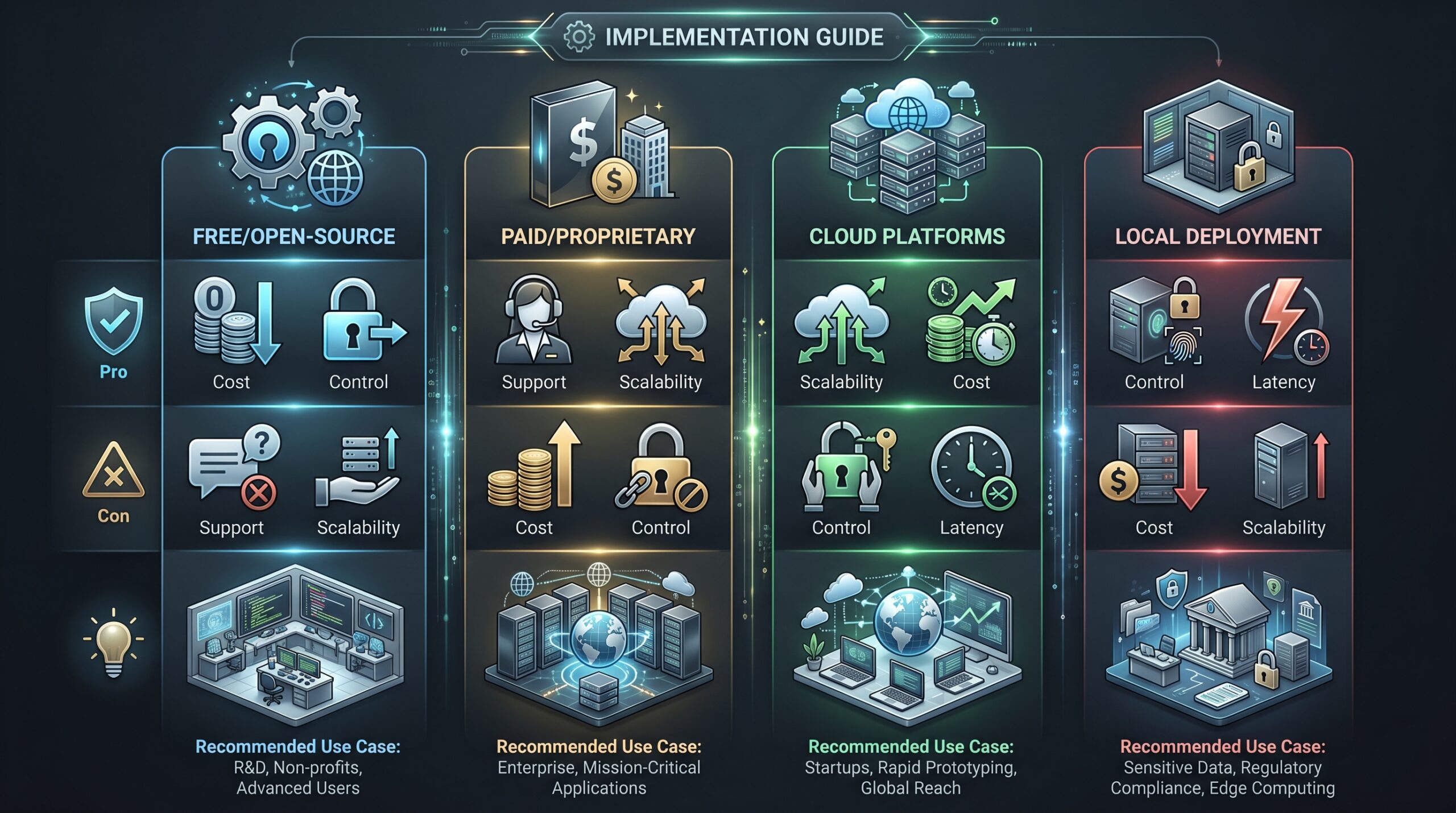
| Category | Pros | Cons | Recommended For |
|---|---|---|---|
| Free/Open-Source | No licensing costs, full control, customizable | Higher operational overhead, limited support | Budget-conscious teams, customization needs |
| Paid/Proprietary | Polished experience, reliable support, regular updates | Ongoing costs, vendor lock-in potential | Professional teams, production environments |
| Cloud Platforms | Scalability, managed infrastructure, enterprise features | Data privacy concerns, consumption-based pricing | Enterprise applications, large-scale deployments |
| Local Deployment | Complete data control, offline capability | Hardware requirements, maintenance overhead | Sensitive data environments, offline needs |
Implementation Guide: Integrating AI Agents into Your Workflow
Integrating AI agents effectively into development workflows requires a structured approach. Starting small, scaling incrementally, and establishing clear guidelines are key to maximizing their benefits.
Setting Up Your First AI Agent
Start with a focused use case rather than attempting full automation immediately. Common starting points for integration include:
- Code review automation for pull requests
- Automated test generation for new features
- Bug diagnosis and fix suggestion
- Documentation generation from code comments
For Cursor implementation:
# Install Cursor CLI
npm install -g @cursorinc/cli

# Authenticate with your account
cursor auth login

# Configure project settings
cursor init --project-type=nodejs --review-automation=true
For Claude Code terminal integration:
# Install Claude CLI
gem install claude-terminal

# Set up API key
export CLAUDE_API_KEY=your_key_here

# Configure default model
claude config set default_model=opus-4.7
Team-Wide Deployment Checklist
A successful team-wide deployment involves careful planning and execution across multiple stages.
AI Agent Team Deployment Checklist
- Assessment Phase: Identify pain points, evaluate data privacy, estimate ROI.
- Tool Selection: Match capabilities to needs, consider existing toolchain, plan scalability.
- Pilot Implementation: Start small, establish guidelines, set up monitoring.
- Full Deployment: Roll out with training, implement governance, establish feedback.
-
Assessment Phase
- Identify specific pain points and automation opportunities
- Evaluate data privacy and security requirements, especially in light of US government AI model oversight.
- Estimate ROI based on time savings projections
-
Tool Selection
- Match agent capabilities to team needs
- Consider existing toolchain integration
- Plan for scalability and future requirements
-
Pilot Implementation
- Start with small team or project
- Establish usage guidelines and best practices
- Set up monitoring and metrics collection
-
Full Deployment
- Roll out across teams with training
- Implement governance and review processes
- Establish feedback mechanisms for improvement
Case Study: E-commerce Platform Migration
A mid-sized e-commerce company used Claude Code with Opus 4.7 to migrate from React Class components to Function components with hooks. This demonstrates the agent’s capability to handle complex refactoring tasks autonomously.
The agent:
- Analyzed the existing codebase (142 components across 23 files)
- Created a migration plan prioritizing complex components first
- Executed the conversion while maintaining test coverage
- Ran existing tests after each conversion
- Generated progress reports and identified components needing manual review
The project completed in 11 days instead of the estimated 6 weeks, with only 8 components requiring human intervention due to complex state management patterns. This led to significant time and cost savings.
Case Study: API Security Audit
A financial technology company implemented Cursor for automated security auditing of their REST APIs. This application highlighted the agent’s ability to integrate into existing CI/CD pipelines for robust security checks.
The agent:
- Integrated with their existing CI/CD pipeline
- Performed automated security scans on each pull request
- Identified OWASP Top 10 vulnerabilities
- Suggested specific fixes with code examples
- Escalated critical issues to senior developers
The implementation reduced security-related bugs in production by 73% over six months and decreased security review time from hours to minutes, showcasing a substantial improvement in security posture.
Risk Mitigation and Best Practices
While AI agents offer immense benefits, they also introduce new risks. Implementing robust mitigation strategies and adhering to best practices are essential for secure and effective integration, particularly concerning the impact of AI on cybersecurity.
Security Considerations
AI-generated code requires rigorous security review. Implement these practices:
- Code Review Mandatory: Never deploy AI-generated code without human review to catch potential vulnerabilities or errors.
- Security Scanning: Integrate SAST (Static Application Security Testing) and DAST (Dynamic Application Security Testing) tools into your agent workflow.
- Access Controls: Limit agent permissions to minimum required access to prevent unauthorized actions and data breaches.
- Audit Logging: Maintain comprehensive logs of all agent actions for accountability and easier troubleshooting in case of issues.
Data Privacy Protection
When using cloud-based agents, data privacy is paramount. Adhere to these guidelines:
- Data Classification: Identify sensitive data that shouldn’t leave your environment and ensure it’s not processed by external agents.
- Contract Review: Understand how providers handle and retain your data by thoroughly reviewing their terms of service and privacy policies.
- Encryption: Ensure data in transit and at rest encryption for all information processed by AI agents to safeguard against eavesdropping.
- Compliance Mapping: Verify agent usage meets regulatory requirements (GDPR, HIPAA, etc.) to avoid legal repercussions and maintain trust.
Cost Management Strategies
AI agent costs can escalate quickly if not managed proactively. Control expenses through:
- Usage Monitoring: Implement detailed cost tracking and alerts to stay informed about expenditure patterns.
- Resource Optimization: Right-size agent capabilities to needs, avoiding over-provisioning resources that lead to unnecessary costs.
- Caching Strategies: Reduce redundant API calls by implementing effective caching mechanisms for frequently requested data or computations
- Budget Allocation: Set team or project-level spending limits to prevent uncontrolled expenditure and ensure financial accountability.
Performance Optimization
Maximize agent effectiveness while minimizing costs through optimized performance:
- Prompt Engineering: Invest in developing effective prompts and templates that guide agents to generate precise and high-quality outputs efficiently.
- Context Management: Provide optimal context without information overload, ensuring agents have enough information to perform tasks accurately without being overwhelmed.
- Error Handling: Implement robust fallback mechanisms for agent failures, allowing them to recover gracefully or notify human operators to intervene.
- Feedback Loops: Continuously improve based on performance metrics and user feedback, refining agent behavior and system integration over time.
Future Trends and Developments
The AI agent landscape continues evolving rapidly. Key trends to watch in 2026-2027 indicate a shift towards more specialized, autonomous, and ethically governed systems.
- Specialized Agents: Movement toward domain-specific agents optimized for particular languages, frameworks, or problem types. This will enable higher accuracy and efficiency in specialized tasks, mirroring advancements like OralMLLM-Bench in niche AI evaluation.
- Improved Autonomy: Agents capable of longer-running tasks with better error recovery and less human supervision. This will further reduce the need for constant human intervention, akin to training-free time-series forecasting.
- Standardization Emergence: Development of standards like SKILL.md and MCP support for defining and managing agent capabilities. This will foster interoperability and easier integration across different platforms.
- Local Optimization: Better performance on consumer hardware reducing cloud dependency for common tasks. This trend supports on-device AI and promotes greater data privacy.
- Ethical Frameworks: Increased focus on responsible AI development with better bias detection and mitigation. This ensures agents are developed and deployed fairly and transparently.
Frequently Asked Questions
What is the best AI agent for beginner developers?
GitHub Copilot provides the gentlest learning curve with immediate code completion benefits. Cursor offers more advanced capabilities while maintaining accessibility. Starting with these before exploring more autonomous agents like Claude Code is recommended for new developers.
How much do AI agents actually cost to use?
Prices range from $10/month for basic Copilot to $100+/month for advanced autonomous agents. Enterprise platforms involve consumption-based pricing that can reach thousands monthly for heavy usage. Open-source options have no licensing costs but require operational overhead for hosting and maintenance.
Are AI agents replacing human developers?
No. AI agents augment developer capabilities by handling repetitive tasks and providing assistance. They allow developers to focus on higher-level design, architecture, and complex problem solving while automating routine coding work, rather than replacing human roles.
How accurate is AI-generated code?
Quality varies by agent and task complexity. Simple code generation can approach 90%+ accuracy while complex architectural work may require significant human refinement. All AI-generated code requires thorough review and testing before production use to ensure reliability.
What programming languages are best supported?
Python, JavaScript/TypeScript, Java, and C# enjoy the best support across most agents. Support for newer or niche languages varies significantly. Always verify language support for your specific needs before committing to an agent to ensure compatibility.
How do I ensure my code remains secure when using AI agents?
Implement mandatory code review processes, use security scanning tools like SAST and DAST, limit agent permissions only to what is necessary, and avoid sending sensitive code to external services. For the highest security requirements, consider using locally-hosted open-source agents.
Can AI agents work with existing large codebases?
Yes, but effectiveness varies. Agents with strong context management like Cursor and Claude Code handle large codebases better. It is advisable to start with focused tasks within specific code sections before attempting broad codebase changes to manage complexity.
What’s the difference between AI assistants and AI agents?
Assistants primarily provide suggestions and information, requiring human action. In contrast, agents take autonomous actions and make decisions to achieve goals independently. An assistant might recommend code changes, while an agent would implement those changes and create a pull request automatically.