
In 2026, the AI coding tool landscape is dominated by AI-native IDEs like Cursor and powerful autonomous agents such as Claude Code and OpenAI Codex with GPT-5.5.
While models like Gemini 3.1 Pro excel in raw benchmarks, real-world utility often comes from tools that enhance developer workflows. The optimal choice depends on factors like integration preference (IDE vs. terminal), security needs (air-gapped vs. cloud), budget, and the specific tasks to be automated, ranging from daily code completion to multi-file refactors and full project automation.
Emerging tools like Devin and Lovable are pushing the boundaries of end-to-end coding and rapid MVP creation, making a clear understanding of the evolving ecosystem crucial for developers. Critical considerations include mitigating risks like over-reliance on AI, ensuring code security, and understanding the nuances of vendor lock-in and intellectual property.
In 2026, the best AI coding tools span a range from AI-native IDEs like Cursor and agentic tools such as Claude Code and OpenAI Codex with GPT-5.5, to specialized assistants like GitHub Copilot. The optimal choice depends on whether you prioritize raw benchmark performance (Gemini 3.1 Pro), autonomous agentic workflows (Claude Code, OpenAI Codex), or an integrated development experience (Cursor). This guide covers every top tool, including detailed comparisons, practical implementation steps, and real-world case studies, to help you select and master the right AI for your specific development needs.
Key Takeaways: Best AI Coding Tools 2026
- Gemini 3.1 Pro leads pure AI model benchmarks, while Grok leads raw benchmarks; Claude catches up when tools are involved.
- Cursor is highlighted as the most polished AI-native IDE for everyday coding and its ‘bring-your-own-model’ flexibility.
- Claude Code excels as a powerful autonomous agent for terminal-first developers, handling multi-file refactors and testing.
- OpenAI Codex with GPT-5.5 (and Codex 3.0) is identified for the best overall coding-agent workflow and end-to-end coding automation.
- Windsurf offers affordability and unlimited free completions, while Tabnine is the standard for air-gapped enterprise environments.
- Newer entrants like Devin and Lovable focus on end-to-end coding and fast MVP creation, respectively.
Defining the AI Coding Tool Landscape in 2026
An AI-Native IDE is an Integrated Development Environment built from the ground up with AI capabilities deeply integrated into its core functionalities, such as code generation, completion, and debugging. Unlike plugins for traditional IDEs like VS Code, these tools, like Cursor, are designed with AI as the central interaction model.
Agentic AI Coding Tools are AI systems designed to act autonomously on behalf of a developer. They perform complex tasks like multi-file refactors, bug fixing, test iteration, and even managing entire development workflows (e.g., creating pull requests, CI automation). Claude Code and OpenAI Codex are prime examples, moving beyond simple suggestions to active participation in the development lifecycle.
The developer audience is also diversifying. Terminal-first developers primarily interact with their environment through a command-line interface, valuing efficiency and scriptability. For them, agentic tools that operate in the terminal are crucial. Conversely, enterprises with air-gapped environments—highly secure systems physically isolated from the internet—require specialized, offline-capable tools like Tabnine.
Top AI Coding Agents and IDEs Compared
This table provides a high-level comparison of the leading tools to help you quickly identify candidates for your workflow.
| Tool | Primary Strength | Key Highlight | Best For |
|---|---|---|---|
| Cursor | Most polished AI-native IDE, everyday coding, Agent Mode, bring-your-own-model | Fast, valuable, highly integrated experience | Developers wanting a seamless, AI-first coding environment. |
| Claude Code | Autonomous agent, terminal-first development, multi-file refactors, research, test iteration | Excels in complex, agentic workflows | Terminal-first developers tackling large-scale code changes. |
| OpenAI Codex (GPT-5.5/Codex 3.0) | Best overall coding-agent workflow, end-to-end coding, testing, PRs, CI automation | Comprehensive automation for the entire SDLC | Teams seeking full lifecycle automation and integration. |
| Devin (by Cognition) | End-to-end coding, testing, PRs, CI automation | Focus on full development lifecycle automation | Projects requiring a fully autonomous AI engineer. |
| Windsurf | Affordable entry, unlimited free completions | Cost-effective, good for beginners/budget-conscious | Individual developers and startups on a tight budget. |
| Tabnine | Air-gapped enterprise environments | Unique solution for offline, high-security needs | Enterprises with strict security and compliance needs. |
| AskCodi | Overall best AI for coding (per extensive tests), clean code generation, debugging | High performance across general coding tasks | Developers needing a reliable, all-around coding assistant. |
| CodeGeeX | Free for individual developers, 20+ languages, code generation/translation | Accessible, multi-language support, cost-free | Students and individual developers seeking a free tool. |
Deep Dive: Cursor – The AI-Native IDE Leader
Cursor has established itself as the most polished AI-native IDE for everyday coding as of May 2026. It’s frequently described as the “most useful AI tool that I currently pay for” due to its exceptional speed, intelligent autocompletion, sensible keyboard shortcuts, and deep Agent Mode integration.
The core of Cursor’s appeal is its design. It’s a fork of VS Code but rebuilt with AI as the primary interface. You don’t just get a chat sidebar; the entire editor anticipates your needs. The Cmd/Ctrl+K shortcut brings up a command bar that can generate code, answer questions about your codebase, or create tests based on the currently open file and project context.
A standout feature is its “bring-your-own-model” (BYOM) functionality. While Cursor has a default capable model, you can configure it to use API keys for OpenAI’s GPT-5.5, Anthropic’s Claude Opus 4.7, or Google’s Gemini 3.1 Pro. This flexibility future-proofs your investment and lets you tailor the AI’s “personality” to your task—using a more creative model for brainstorming and a more structured one for refactoring.
Agent Mode is where Cursor shines for complex tasks. Instead of just writing a function, you can tell Cursor’s agent to “refactor the UserAuthentication class to use the new OAuth library, update all unit tests, and ensure the documentation comments are accurate.” The agent will then plan and execute these changes across multiple files, showing you a diff for approval before committing the changes. This moves beyond code completion to true AI-powered development.
Practical Implementation Steps for Cursor:
- Download and install Cursor from the official website.
- Open an existing project or create a new one.
- Familiarize yourself with the
Cmd/Ctrl+Kcommand bar. - Experiment with simple code generation (e.g., “write a Python function to validate an email address”).
- Explore the settings to configure a BYOM model if desired.
- Test Agent Mode on a non-critical task, like adding comments to a complex function.
Deep Dive: Claude Code – The Autonomous Terminal Agent
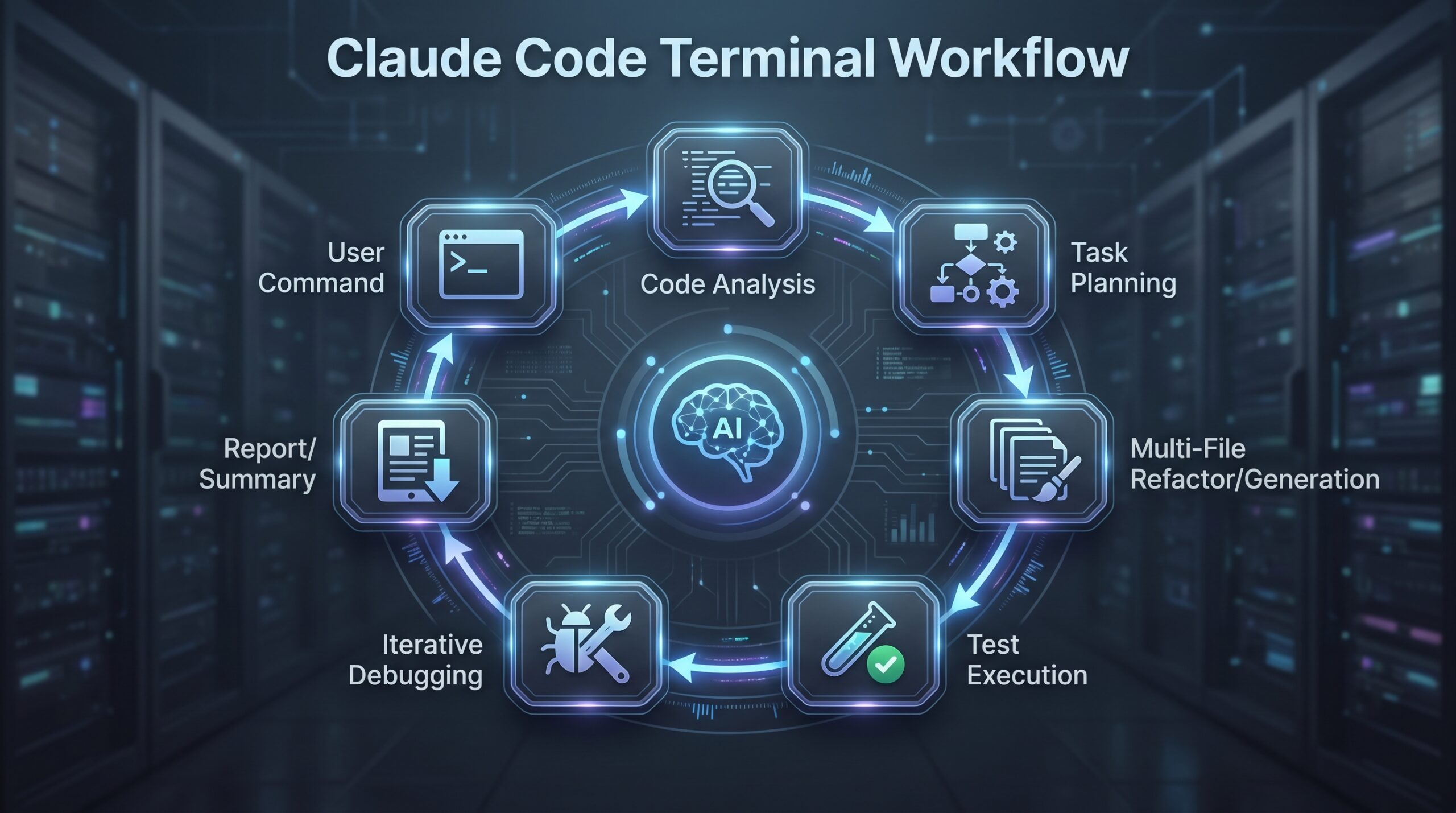
Claude Code, powered by Anthropic’s Claude Opus 4.7 model, excels as a powerful autonomous agent for terminal-first developers. Its strength lies in handling complex, multi-step tasks that span research, code modification, and testing, all from the command line.
Unlike IDE-integrated tools, Claude Code operates in your terminal. You interact with it via a CLI command, giving it natural language instructions for tasks that would normally require significant manual effort. For example, a command like claude-code "research the best logging library for a new Node.js microservice, then refactor the existing would trigger a series of autonomous actions.app.js to use it and write a basic test"
The tool’s capability for multi-file refactors is exceptional. It can understand the context across your entire codebase, make coordinated changes in several files, and run tests to validate its work. This is ideal for large-scale migrations, like updating a deprecated API across a monorepo or implementing a new design pattern consistently.
Claude Code is particularly valuable for test iteration. You can command it to “increase the test coverage for the PaymentService module to 90%,” and it will analyze the existing code, identify untested paths, and generate relevant unit and integration tests. It can also debug failing tests by analyzing the error output and suggesting fixes.
Case Study: Refactoring a Legacy API Module
A developer maintains a legacy Python Flask API with inconsistent error handling. Using Claude Code, they issue the command: “Refactor all endpoint functions in the api/ directory to use a consistent JSON error response format for 4xx and 5xx errors. Create a new error_handlers.py module for the helper functions. Ensure all existing unit tests still pass.”
Claude Code proceeds to:
- Analyze the current code structure in the
api/directory. - Draft a new
error_handlers.pymodule with standardized functions. - Systematically update each endpoint function to catch exceptions and use the new error handlers.
- Run the existing test suite to identify any regressions.
- Provide a summary report of the changes and test results.
This task, which might take a developer hours, is reduced to a single command and a few minutes of autonomous execution.
Deep Dive: OpenAI Codex with GPT-5.5 – The End-to-End Workflow Champion
OpenAI Codex, now integrated with the GPT-5.5 model (often referred to as Codex 3.0), is noted for providing the best overall coding-agent workflow. It emphasizes end-to-end automation, handling tasks from initial code generation through testing, pull request creation, and even CI/CD pipeline integration.
The evolution to Codex 3.0 represents a shift from a code-completion engine to a full-fledged software development agent. It can manage state across long-running sessions, maintaining context about your project’s goals, architecture, and constraints. This allows it to undertake complex projects like “build a secure user authentication system with JWT, including database models, API routes, and frontend components.”
A key strength is its integration with development infrastructure. Codex can be configured to interact with GitHub, creating branches and drafting pull requests with detailed descriptions upon completing a feature. It can also trigger CI/CD pipelines, wait for results, and automatically fix issues identified by linters or tests. This makes it a powerful tool for agile teams looking to automate repetitive aspects of their workflow.
The GPT-5.5 model underlying this tool brings improved reasoning and a deeper understanding of software architecture. It’s less likely to suggest syntactically correct but architecturally flawed code. It can argue for or against specific patterns (e.g., microservices vs. monolith) based on the project’s stated requirements, acting more as a junior partner than a simple code generator.
Underlying AI Models: Benchmarks vs. Real-World Performance
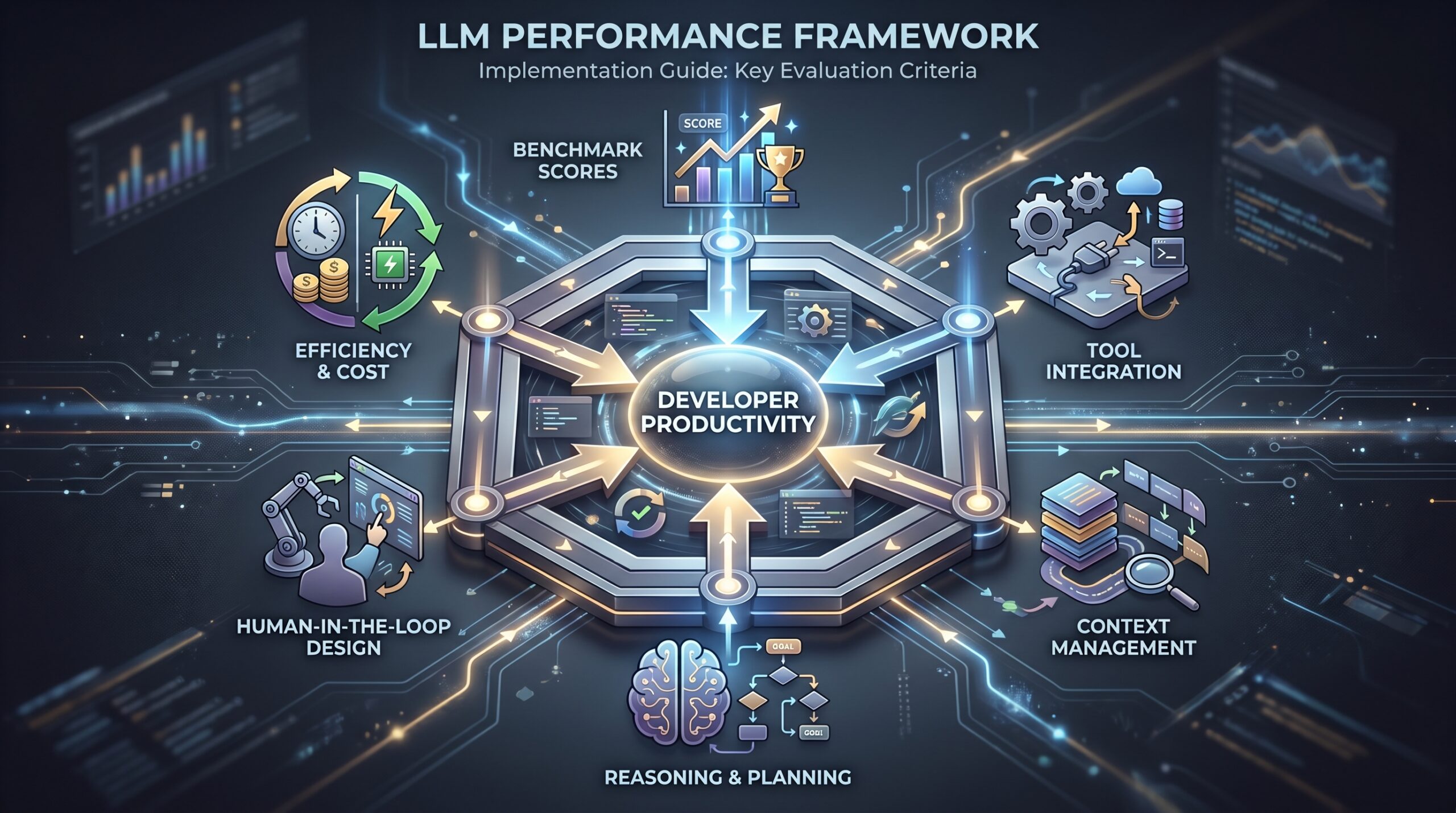
While tool integration is critical, the underlying large language model (LLM) powers the AI’s core capabilities. Benchmarks provide a snapshot of raw performance, but real-world utility often differs.
| Model | Performance Aspect | Performance Metric | Real-World Implication |
|---|---|---|---|
| Gemini 3.1 Pro | Pure benchmarks | Leads | Excels at structured coding challenges and algorithm design. A strong choice for code generation in controlled tasks. |
| Grok | Raw benchmarks | Leads | Performs well on synthetic tests but may lag in nuanced understanding required for complex, real-world codebases. |
| Claude (Opus 4.7) | When tools are involved | Catches up | Its true power is unlocked in agentic settings (like Claude Code), where it can use external tools to overcome pure benchmark limitations. |
This discrepancy highlights a critical point for 2026: raw benchmark scores are a poor proxy for developer productivity. A model like Claude may not top every synthetic test, but its ability to effectively plan and use tools (compilers, linters, APIs) makes it exceptionally powerful in practice. When evaluating tools, prioritize demonstrations of real-world task completion over leaderboard positions.
Specialized and Niche AI Coding Tools
Beyond the generalist leaders, several tools cater to specific needs, constraints, and budgets.
Windsurf: The Affordable Powerhouse
Windsurf is highlighted for offering the most affordable entry point with unlimited free completions. It strikes a balance between capability and cost, making it an excellent choice for students, hobbyists, and bootstrapped startups. Its free tier is generous, and its paid plans are significantly cheaper than many competitors while still providing robust code generation and completion features.
Tabnine: The Enterprise Standard for Security
Tabnine is specified as the only viable option for air-gapped enterprise environments. Many large financial, government, and healthcare organizations cannot allow their code to be sent to external cloud APIs. Tabnine addresses this by offering a fully on-premises deployment where the entire model runs on the company’s internal servers. It also provides robust code privacy and security guarantees for its cloud version, making it the go-to for security-conscious teams.
AskCodi: The All-Around Performer
According to extensive tests in 2026, AskCodi is identified as the best overall AI for coding. It generates clean, production-ready code and is particularly adept at debugging complex errors. It supports a wide range of languages and frameworks and provides a straightforward interface that integrates well with popular IDEs, making it a reliable choice for developers who want a powerful, no-fuss assistant.
CodeGeeX: The Free and Open Contender
CodeGeeX supports more than 20 programming languages, including Python, Java, Go, and C++. Its primary advantage is that it offers free use for individual developers. It provides not only code completion but also code translation between languages, making it a valuable tool for developers working with multiple tech stacks or migrating legacy systems.
Emerging Tools: Devin, Lovable, and the Future
The AI coding landscape is rapidly evolving, with new entrants pushing the boundaries of automation.
Devin by Cognition is an ambitious project that emphasizes true end-to-end coding. It’s not just an assistant; it’s envisioned as an autonomous AI engineer. Devin can tackle entire software projects from a high-level specification, handling coding, testing, creating pull requests, and managing CI automation with minimal human intervention. It represents the frontier of agentic AI.
Lovable targets a different niche: fast MVP creation. It combines AI code generation with visual editing tools, GitHub synchronization, and simple deployment mechanisms. The goal is to allow developers or even founders to describe an application and have Lovable generate a functional prototype in hours, not weeks. It’s ideal for validating product ideas quickly.
Tools like v0 and Replit Agent also continue to shape the space, often focusing on specific frameworks or deployment platforms, further illustrating the trend towards specialization.
How to Choose the Right AI Coding Tool for Your Needs
Selecting the best tool requires a clear assessment of your primary constraints and goals. Use this decision matrix to guide your choice.
Primary Decision Matrix:
- What is your development environment?
- Terminal-First: Prioritize Claude Code or the Gemini CLI.
- IDE-Centric (wants deep integration): Choose Cursor or a deeply integrated Copilot/Codewhisperer in VS Code/JetBrains.
- Browser-Based/Replit: Tools like Replit Agent are a natural fit.
- What is your team’s security requirement?
- Air-Gapped/Strict Compliance: Tabnine (Enterprise) is the only real choice.
- Standard Cloud/SaaS acceptable: All other tools are viable.
- What is your budget?
- $0 (Free): Start with Windsurf’s free tier, CodeGeeX, or free tiers of other tools.
- Individual/Startup (<$50/month): Cursor, Windsurf Pro, or AskCodi offer great value.
- Enterprise: Evaluate Tabnine, GitHub Copilot Enterprise, or OpenAI Codex with volume pricing.
- What is your primary task?
- Everyday Coding & Completions: Cursor, GitHub Copilot.
- Large Refactors & Agentic Workflows: Claude Code, OpenAI Codex.
- Rapid Prototyping/MVP Building: Lovable.
- Full Project Automation: Devin, OpenAI Codex.
Implementation Checklist: Integrating an AI Coding Tool
Follow this step-by-step checklist to successfully integrate a new AI tool into your workflow.
-
[ ] Define Success Criteria: What specific problem are you trying to solve? (e.g., “reduce time spent writing boilerplate by 30%,” “automate test generation for new features”).
-
[ ] Select 2-3 Candidate Tools: Based on the decision matrix above, shortlist tools for a trial. Avoid evaluating more than three at once.
-
[ ] Run a Time-Boxed Pilot (1-2 weeks): Use each tool on real, but non-critical, tasks. Track time saved, code quality, and frustration levels.
-
[ ] Evaluate Integration Effort: How easy was it to install, configure, and use daily? Did it fit your existing workflow or force a change?
-
[ ] Check for Vendor Lock-in: Does the tool use a proprietary format? Can you export your data? For BYOM tools like Cursor, this risk is lower.
-
[ ] Review Security & Privacy: For teams, ensure the tool’s data handling policies comply with your organization’s standards. For sensitive IP, opt for on-premise options like Tabnine.
-
[ ] Calculate ROI: Compare the subscription cost against the estimated time savings and quality improvements.
-
[ ] Plan for Team Rollout: If adopting team-wide, create brief documentation, best practices, and a channel for support questions.
AI Coding Tool Integration Checklist
- 1. Define Success Metrics: Quantifiable goals (e.g., build time reduction, bug density).
- 2. Candidate Tools Selection: Shortlist 2-3 tools based on needs.
- 3. Pilot Program: Small-scale, time-boxed trial on real tasks.
- 4. Evaluate Workflow Integration: Ease of setup, daily use, impact on existing processes.
- 5. Vendor & Data Assessment: Review lock-in, exportability, privacy policies.
- 6. ROI & Cost-Benefit Analysis: Compare subscription costs with productivity gains.
- 7. Team Adoption Strategy: Documentation, training, ongoing support plan.
Risks and Mitigation Strategies for AI Coding Tools
Adopting AI tools comes with potential pitfalls. Here’s how to mitigate them.
-
Risk: Over-reliance on AI-Generated Code
- Mitigation: Treat AI output as a first draft. Always review, understand, and test all generated code. Enforce code reviews that specifically check for AI-introduced issues like security vulnerabilities or incorrect logic.
-
Risk: Outdated or Hallucinated Code
- Mitigation: AI models can suggest deprecated libraries or patterns. Specify version constraints in your prompts (e.g., “use React 18 syntax”). Use tools that have access to recent documentation or can browse the web.
-
Risk: Vendor Lock-in and Cost Creep
- Mitigation: Prefer tools with standard, exportable outputs. Be aware of usage-based pricing models that can become expensive. Start with free tiers to gauge usage before committing.
-
Risk: Intellectual Property and Privacy
- Mitigation: Scrutinize the tool’s privacy policy. Does it use your code for training? For highly sensitive projects, use tools that offer local processing or on-premise deployment.
-
Risk: Skill Stagnation
- Mitigation: Use AI as a productivity multiplier, not a crutch. Deliberately practice tasks without AI assistance to maintain fundamental skills. Use AI to learn new concepts by asking it to explain its suggestions.
Case Study: Building a Feature with AI Assistance
Scenario: A small startup needs to add a “forgot password” feature to their Node.js/Express application. They decide to use a combination of Cursor and Claude Code.
-
Planning with Cursor: The developer opens the project in Cursor. Using
Cmd+K, they prompt: “Outline the steps and necessary components to implement a secure ‘forgot password’ flow in a Node.js/Express app with a PostgreSQL database. Include email sending, JWT for reset tokens, and rate limiting.”- Result: Cursor generates a detailed plan: create a
PasswordResetTokenmodel, add aPOST /forgot-passwordendpoint to generate and email a token, add aPOST /reset-passwordendpoint to validate the token and update the password, and implement rate limiting on the endpoints.
- Result: Cursor generates a detailed plan: create a
-
Implementation with Cursor’s Agent Mode: The developer uses Agent Mode: “Implement the plan you just outlined. Use the
nodemailerlibrary for email andjsonwebtokenfor tokens. Integrate the code with our existingUsermodel andauthRouter.”- Result: The agent creates the new database model, generates the two new API routes with proper error handling, and inserts them into the existing router file. It also creates a new utility file for sending emails.
-
Testing and Refinement with Claude Code: The developer switches to the terminal. They run the existing test suite to check for regressions. A test fails. They use Claude Code: “The test
user_login.test.jsis failing after adding password reset routes. Analyze the error and fix the test.”- Result: Claude Code examines the test error, deduces that the test database schema is out of date, and suggests running the migration script before the tests. It then confirms the test passes.
This workflow demonstrates how different tools can be combined: Cursor for planning and integrated code generation, and Claude Code for autonomous troubleshooting and terminal-based tasks.
Future Trends: Where AI Coding is Headed Beyond 2026
The trends in 2026 point towards even deeper integration and autonomy.
- Hyper-Specialization: Tools will become even more tailored to specific domains like fintech, genomics, or game development, with models trained on relevant code and documentation.
- Seamless Multi-Model Workflows: IDEs will intelligently route tasks to different AI models—using one for code generation, another for debugging, and a third for documentation—without developer intervention.
- AI-Driven Architecture: AI will move beyond writing code to actively suggesting and implementing architectural improvements, such as identifying when to split a monolith or recommending a more efficient data storage pattern.
- Proactive Maintenance: Agents will continuously monitor codebases for tech debt, security vulnerabilities, and performance regressions, suggesting and even implementing fixes proactively.
FAQ
What is the single best AI coding tool in 2026?
There is no single “best” tool for everyone. Cursor is the best overall AI-native IDE for daily use. Claude Code is the best autonomous agent for terminal workflows. Your choice depends entirely on your specific development style, project needs, and security requirements.
Are free AI coding tools like CodeGeeX and Windsurf good enough?
For individual developers, students, and small projects, free tools are often more than sufficient. They provide powerful code completion and generation. However, for advanced features like complex agentic workflows, deep IDE integration, or enterprise-grade security, paid tools like Cursor or Tabnine are necessary.
How do I ensure the code generated by AI is secure?
You must treat AI-generated code as untrusted. Always conduct thorough security reviews, run static analysis tools (SAST) like Snyk Code or SonarQube on the output, and perform extensive testing. Do not blindly deploy AI-generated code, especially for security-critical functions.
Can AI coding tools work offline?
Most AI coding tools require an internet connection to communicate with cloud-based models. The primary exception is Tabnine, which offers an enterprise version that can be deployed entirely on-premises for air-gapped environments. Some smaller models might offer limited offline functionality, but it is not the norm.
Will AI coding tools replace developers?
No, they are augmenting developers. These tools automate repetitive and boilerplate tasks, allowing developers to focus on higher-level design, complex problem-solving, architecture, and collaboration. The role of the developer is shifting from writing every line of code to directing and curating the output of AI assistants.
This article was updated with the latest information and tool assessments as of May 5, 2026.