
Yes, $20 a day is a good starting point for new Google Ads advertisers in 2026, especially for local businesses or niche e-commerce using Feed-only Performance Max. This budget allows for meaningful data collection and optimization without significant financial risk, but its effectiveness depends heavily on your industry, goals, and strategic implementation of targeting and bidding.
Yes, starting with a $20 daily budget ($600 monthly) is a solid and recommended strategy for new Google Ads advertisers in 2026. It provides enough spend to generate meaningful data for optimization without a massive upfront investment, especially when targeting less competitive niches or using specific campaign types like Feed-only Performance Max. However, its effectiveness is highly dependent on your industry, goals, and how strategically you allocate the budget.
Google’s official stance is that there is no minimum budget—campaigns can technically run on as little as $1 per day. But at $20 per day, with an average Cost Per Click (CPC) of around $3.15 USD, you can expect approximately 8 clicks daily. This volume is sufficient to start testing ad copy, landing pages, and targeting, but it’s often inadequate for highly competitive B2B sectors or aggressive scaling, which may require monthly budgets of $5,000-$12,000 for effective Smart Bidding.
How Google Ads Uses Your $20 Daily Budget
Google Ads operates on an auction system. When someone searches for a keyword you’re targeting, Google calculates an Ad Rank for your ad based on your bid amount, ad quality, and expected impact from ad extensions. Your $20 daily budget is the average amount you’re willing to spend per day over a month. Google may spend up to 20.4% more on some days (up to $24.08), but it will never exceed your monthly charging limit (30.4 times your daily budget, or $608 for a $20 budget).
Your budget dictates your campaign’s potential reach. If your average CPC is $5, a $20 budget yields about 4 clicks per day. If you succeed in lowering your CPC to $2 through better targeting and Quality Score, that same budget now generates 10 clicks. This is why optimization is critical, even with a modest budget. The platform’s pacing controls manage how quickly your budget is spent throughout the day to align with your bidding strategy’s goals. As of 2026, new features like Journey-Aware Bidding further automate this, increasing spend on high-demand days and reducing it during lulls.
What "Limited by Budget" Means for a $20 Campaign
A status of "Limited by Budget" appears in your campaign settings when Google believes you could have garnered more conversions or clicks if you had a higher daily budget. For a $20/day campaign, this is a common and often positive signal. It indicates that your keywords, targeting, and ad quality are effective enough that there is more search volume available than your current budget can capture.
However, it’s a cue to analyze performance before blindly increasing spend. Check your Search Terms Report to ensure clicks are coming from relevant queries. If your conversion rate is strong and Cost Per Acquisition (CPA) is acceptable, a controlled budget increase—say to $25 or $30 per day—can be a safe next step. If you’re not converting, focus on improving your landing page and ad relevance first.
When a $20/Day Google Ads Budget is a Good Idea
A $20 daily budget is an excellent starting point for several specific scenarios. It allows you to enter the market, gather data, and iterate without significant financial risk.
New Advertisers Testing the Waters
For businesses new to Google Ads, $20/day is the ideal testing budget. Industry surveys consistently recommend a starting point of $10-$20 per day ($300-$600 monthly). This budget is low enough to minimize risk but substantial enough to generate the 50-100 clicks per week needed to start discerning what works. Your primary goal at this stage isn’t immediate profitability but learning: which keywords drive traffic, which ad copy resonates, and what landing page converts best.
Local Service Businesses with Geographic Targeting
Plumbers, electricians, roofers, and other hyper-local businesses can thrive on a $20/day budget. By tightly restricting your geographic targeting to a specific city or even a set of zip codes, you eliminate wasted spend on irrelevant clicks from outside your service area. The intent of someone searching for "emergency plumber near me" is extremely high, often leading to a solid conversion rate even with a limited number of daily clicks.
E-commerce in Niche Markets with Feed-only Performance Max
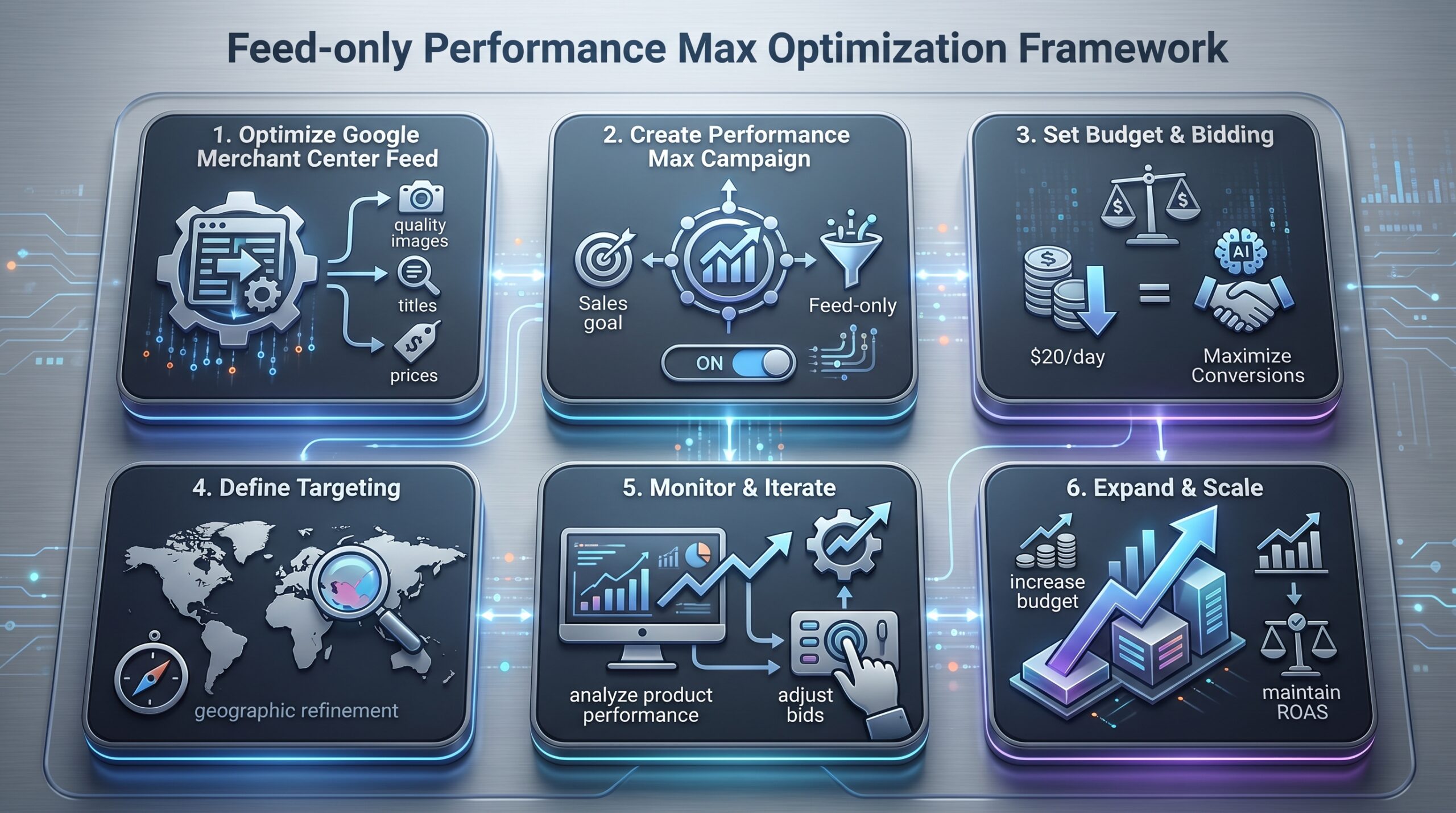
This is a powerful, underutilized strategy for 2026. If you have a product feed (e.g., from Shopify or WooCommerce), a Feed-only Performance Max campaign can be highly effective at a $20/day budget. This campaign type uses your product data and images to create ads across Google’s network (Search, Shopping, Display, YouTube, Discover) but doesn’t require you to provide additional marketing assets like headlines, descriptions, or videos. Google’s AI optimizes for sales using your product feed as the primary input. For niche products with lower competition, this can deliver a strong Return on Ad Spend (ROAS) initially, providing the data needed to scale.
Brand Awareness Campaigns with Display or Video
If your goal is visibility rather than immediate sales, $20/day can fund a respectable awareness campaign on the Google Display Network or YouTube. Cost Per Mille (CPM—cost per thousand impressions) for these networks is often lower than Search CPC. This budget can generate thousands of impressions, building familiarity with your brand among custom affinity or in-market audiences. While harder to track directly to revenue, this top-of-funnel activity is crucial for long-term growth.
💡 Pro Tip: Learn from Google’s AI Insights
Google’s own materials, like Google AI’s ‘The Small Brief’, frequently discuss integrating AI into ad creation and strategy. Understanding these evolving tools is key to maximizing impact even with a limited budget.
When $20/Day is Not Enough for Google Ads
While $20/day is a good start, it’s insufficient for many common business objectives. Recognizing these scenarios will save you from frustration and wasted time.
Highly Competitive Industries (Insurance, Lawyers, Loans)
In sectors like personal injury law, mortgage refinancing, or insurance, the average CPC can easily exceed $50-$100. A $20 daily budget might generate one click every two or three days, which is statistically irrelevant for optimization. Competitors in these spaces often spend thousands per day. A realistic starting budget in these fields is significantly higher, often beginning in the hundreds of dollars per day.
B2B Lead Generation Requiring Smart Bidding
Smart Bidding strategies (like Target CPA or Maximize Conversions) rely on machine learning that needs sufficient conversion data to optimize effectively. Google’s systems typically need to see at least 15-30 conversions per month to begin learning. If your B2B service has a conversion value of $1,000 and a website conversion rate of 2%, you’d need roughly 750-1500 clicks to generate 15-30 leads. With an average B2B CPC of $10-$20, that translates to a monthly ad spend of $7,500-$30,000. This is why B2B campaigns often require $5,000-$12,000/month as a baseline to be viable.
Scaling a Proven, Profitable Campaign
If you have a campaign where every $20 spent generates $50 in revenue, the biggest mistake is leaving the budget at $20. The "Limited by Budget" status is your green light to scale. Incrementally increase the budget by 15-20% every few days while closely monitoring your key metrics (CPA, ROAS). If performance remains stable, continue scaling. A $20/day test budget is not meant to be a permanent cap for a winning campaign.
Broad Targeting or High-Volume Keywords
Using single-word, broad-match keywords like "shoes" or "marketing" will burn through a $20 budget in minutes, delivering low-quality, irrelevant clicks. Effective low-budget campaigns require surgical precision: long-tail keywords, phrase match, and tightly defined audience targeting.
Expected Results from a $20/Day Google Ads Budget
Setting realistic expectations is crucial. Here’s a breakdown of what a $20 budget can achieve under different conditions.
Calculating Your Potential Clicks and Conversions
Your results are a direct function of your Cost Per Click (CPC) and Conversion Rate (CVR).
| Scenario | Avg. CPC | Clicks/Day | Monthly Clicks | Conv. Rate | Monthly Conversions |
|---|---|---|---|---|---|
| Competitive Niche | $8.00 | 2.5 | ~75 | 5% | ~4 |
| Moderate Niche | $3.15 | ~6 | ~190 | 3% | ~6 |
| Low-Competition Niche | $1.50 | ~13 | ~400 | 2% | ~8 |
As the table shows, in a moderate scenario, you might generate 6 leads or sales per month. For a local service business where a lead is worth hundreds of dollars, this can be profitable. For an e-commerce store selling a $30 product, breaking even is the more likely outcome at this stage, with profitability coming from optimization and scaling.
The Data Collection Goal
The primary success metric for your first month with a $20/day budget should not be ROAS, but the quality of data collected. After 30 days and spending $600, you should be able to answer these questions:
- Which 3-5 keywords drive the most valuable clicks?
- Which ad copy has the highest Click-Through Rate (CTR)?
- What is your actual, historical average CPC?
- What is your baseline conversion rate?
- Which demographics (age, gender, location) convert best?
This data is the foundation for all future optimization and scaling decisions.
Google Ads Budget Comparison: $20/Day vs. Other Levels
Understanding how a $20/day budget fits into the broader advertising landscape helps set strategic priorities.
| Budget Tier | Daily Spend | Monthly Spend | Best For | Key Considerations |
|---|---|---|---|---|
| Micro-Testing | $1 – $5 | $30 – $150 | Absolute beginners, ultra-niche products. | Data collection is extremely slow. May not trigger Smart Bidding. Often too small to be effective. |
| Starter Budget | $10 – $20 | $300 – $600 | New advertisers, local services, niche e-commerce. | Our focus. Sufficient for initial learning and validation. Requires careful targeting. |
| Growth Budget | $50 – $100 | $1,500 – $3,000 | Scaling proven campaigns, regional businesses. | Enough volume for reliable Smart Bidding. Can test multiple ad groups or campaigns. |
| Professional B2B | $167 – $400 | $5,000 – $12,000 | B2B lead generation, competitive markets. | Necessary for Smart Bidding to optimize effectively. Can target broader but high-intent keywords. |
| Enterprise Scale | $1,000+ | $30,000+ | National brands, highly competitive industries. | Focus on market share and saturation. Requires dedicated teams or agencies to manage. |
Essential Optimization Strategies for a $20/Day Budget
With a limited budget, every click must count. These strategies maximize the impact of your $20.
Keyword Strategy: Long-Tail and Negative Keywords
Avoid broad match keywords. Instead, use phrase match and exact match for precise control. Focus on long-tail keywords (3-4 words) like "affordable women’s running shoes for flat feet" instead of "running shoes." These have lower search volume but much higher intent and lower CPC.
Implement a robust negative keyword list from day one. Add terms like "free," "cheap," "jobs," and "review" to prevent your ads from showing for irrelevant searches. Regularly review the Search Terms Report to find new negative keywords.
Ad Scheduling and Geographic Targeting
If you’re a local business that only operates from 9 AM to 5 PM, there’s no reason to run ads at 2 AM. Use ad scheduling to show your ads only during relevant hours or days of the week. Similarly, if you only serve a specific city, set your location targeting to "People in or regularly in your targeted locations" to avoid wasting money on tourists or people just passing through.
Leveraging High-Performing Audiences
Google Ads offers over 1,000 targeting options. While a $20 budget is too small for broad audience targeting, layering high-intent audiences can boost performance. In-market audiences (people actively researching products) can drive a 10% higher CTR. Custom intent audiences (based on specific keywords people search for) can increase conversion rates by 20%. Add these as an "observation" setting to your campaigns to gather data on how these segments perform without restricting your ad delivery.
A/B Testing Ad Copy on a Limited Budget
You can still run A/B tests with a low budget. Create two ads (Ad A and Ad B) within the same ad group. Use identical settings but change one element, like the headline or description. Let the test run until each ad has received at least 1,000 impressions. Google Ads will then declare a winner statistically. Pause the loser and create a new challenger for the winner. This continuous cycle of improvement is essential.
Advanced 2026 Strategies: AI Max and Feed-only Performance Max
Google Ads is rapidly evolving with AI. To compete effectively, you need to understand these new tools. For further insights into AI’s role in various domains, exploring the most promising AI stocks might offer context on the broader technological landscape.
Understanding AI Max for Search
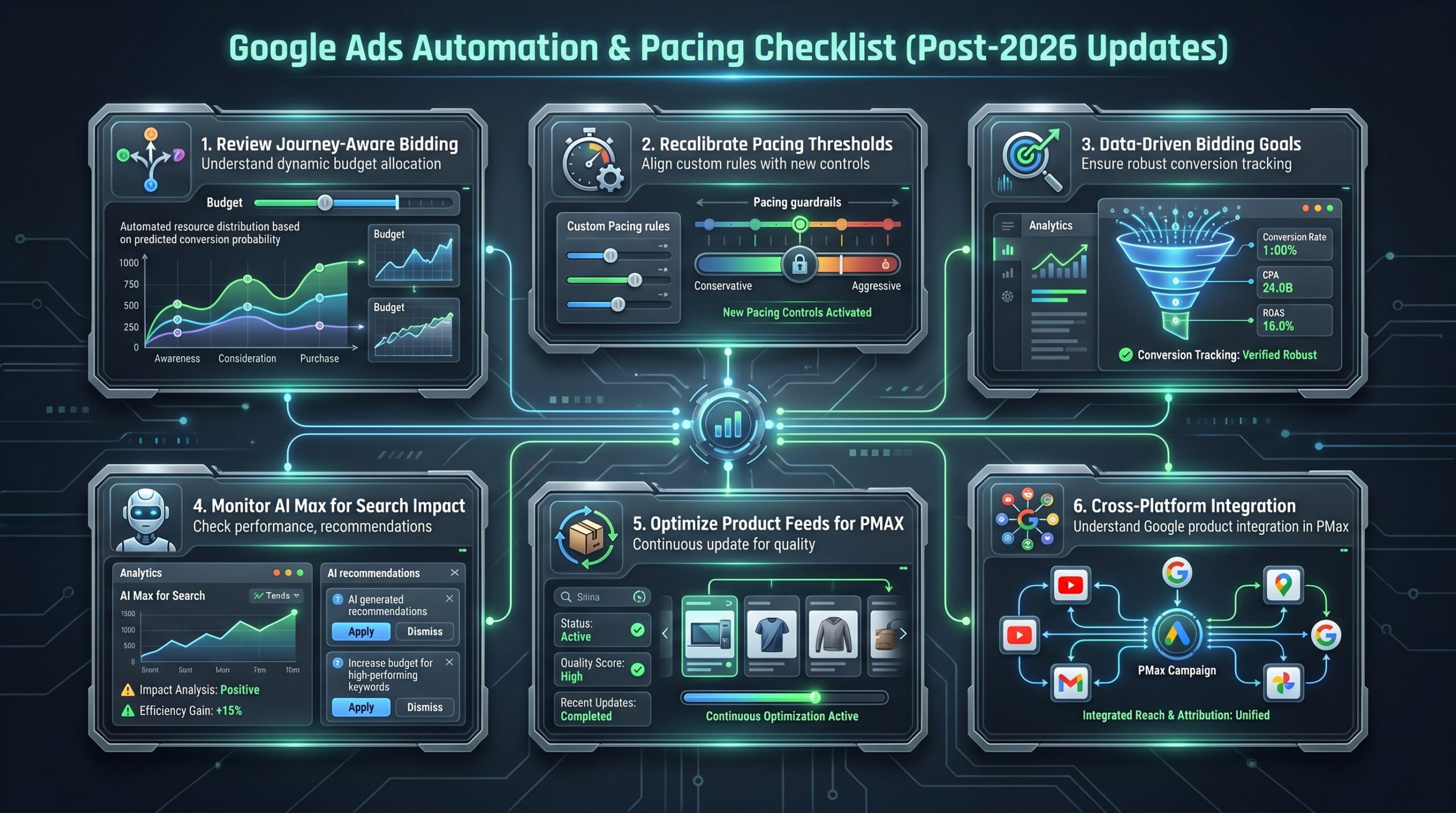
AI Max for Search is an artificial intelligence feature designed to automate campaign management for Search campaigns. It can autonomously adjust bids, create ad variations, and refine targeting to meet your goals. For a $20/day budget, AI Max can be valuable but requires monitoring. It needs data to learn, so ensure your campaign has a clear conversion action (e.g., a purchase or lead form submission) tracked in Google Ads. Start with a conservative Target CPA and closely watch its spending patterns, especially with the new 2026 pacing controls.
Implementing a Feed-only Performance Max Campaign
This is a standout strategy for e-commerce in 2026. Unlike a standard Performance Max campaign that requires you to upload headlines, descriptions, images, and videos, a Feed-only campaign relies solely on your product feed.
How to set it up:
- Ensure your Google Merchant Center feed is optimized with high-quality images, accurate titles, and competitive prices.
- Create a new Performance Max campaign with the goal of "Sales."
- When prompted to add assets, skip this step. This creates a Feed-only campaign.
- Set your budget to $20/day.
- Google’s AI will use your product feed to create ads across its entire network.
This approach often yields a better ROAS in the early stages because the AI isn’t distracted by potentially low-quality marketing assets. It focuses on promoting your products directly to users most likely to buy.
Case Study: Local HVAC Company with $20/Day Budget
Scenario: A small, family-owned HVAC company services a single metropolitan area. Their average job is worth $800, and they need 2-3 new jobs per month to be profitable from ads.
Strategy:
- Campaign Type: Search Campaign with Maximize Clicks bidding (initially).
- Keywords: Phrase match keywords like "AC repair [City Name]," "furnace installation near me," "emergency HVAC service."
- Budget: $20/day.
- Targeting: 15-mile radius around their city; ad schedule from 7 AM to 8 PM.
Results After 60 Days:
- Spend: $1,200
- Clicks: 410 (Avg. CPC: $2.93)
- Calls/Form Submissions: 22 (Conversion Rate: 5.4%)
- Jobs Booked: 5 (Cost Per Acquisition: $240)
- ROAS: ($800 * 5) / $1200 = 3.33, or 333% return.
Analysis: The $20/day budget was sufficient because of the hyper-local targeting and high-intent keywords. The CPA of $240 was highly profitable against an $800 average job value. After two months, the company increased the budget to $35/day to capture more of the available search volume.
Risks and Pitfalls of a Low Google Ads Budget
Being aware of these common mistakes will prevent wasted spend.
Outdated Bidding and Pacing Strategies
Google Ads has introduced Journey-Aware Bidding and new pacing controls in 2026. If you’re using old manual CPC bidding without reviewing these new automated options, you’re likely leaving performance on the table. Journey-Aware Bidding automatically allocates more budget to days with predicted high demand. Advertisers need to recalibrate their automation rules and pacing thresholds to work with, not against, these new systems.
Insufficient Budget for Meaningful Optimization
The greatest risk of a $20/day budget is simply not spending enough to learn anything. If your product has a long sales cycle or a low conversion rate, it might take months to gather enough conversion data for Smart Bidding to function. In such cases, a higher initial investment might be necessary to accelerate learning, or you may need to focus on a higher-funnel conversion action (like a newsletter sign-up) to feed the algorithm data.
Poor Agency Selection and Management Fees
If you hire an agency to manage your $20/day ($600/month) campaign, their fees can consume your entire budget. Agency fees typically range from 15% to 20% of ad spend. On a $600 spend, that’s $90-$120 per month, leaving only $480-$510 for actual ads. For very small budgets, it’s often more cost-effective to learn the basics yourself using Google’s free certifications and guides. Be wary of agencies that promise miraculous results on tiny budgets or charge for "creatives" that are merely basic text overlays.
Low Budget Google Ads Pitfall Avoidance Cheat Sheet
- 1. Don’t Use Broad Match: Stick to phrase and exact match keywords for precision.
- 2. Implement Negative Keywords: Continuously update your negative keyword list to prevent irrelevant clicks.
- 3. Avoid "All Countries" Targeting: Restrict geographic targeting to your actual service area.
- 4. Don’t Ignore Ad Scheduling: Only run ads during business hours or peak customer activity.
- 5. Define & Track Conversions: Without clear conversion data, Smart Bidding won’t optimize.
- 6. Resist Over-Automation Early: Manually monitor daily spend and Search Term Reports in the first few weeks.
- 7. Be Wary of Agency Fees: Ensure agency costs don’t consume too much of your limited ad budget.
- 8. Don’t Expect Immediate Scale: A $20/day budget is for testing and learning, not for rapid expansion.
Over-Reliance on Default Settings
Launching a campaign with all default settings is a recipe for failure. Default location targeting might be set to "All countries," and network settings might include the entire Search Partner network, which can sometimes deliver lower-quality traffic. Always review and configure every campaign setting manually.
$20/Day Google Ads Implementation Checklist
Follow this step-by-step guide to launch your first $20/day campaign correctly.
- Define Your Goal: Choose a single, measurable primary conversion (e.g., purchase, lead form, phone call).
- Install Tracking: Set up Google Ads conversion tracking and/or Google Tag Manager on your website.
- Keyword Research: Use Google’s Keyword Planner to find 10-20 relevant, long-tail keywords with moderate search volume and low-medium competition.
- Structure Your Campaign: Create a single Search campaign. Use phrase match and exact match keywords. Set your daily budget to $20.
- Craft Compelling Ads: Write at least 3 responsive search ads per ad group. Include keywords in headlines, highlight unique value propositions, and use a clear call-to-action.
- Set Up Targeting: Define your geographic locations and, if applicable, set an ad schedule.
- Build Negative Keyword List: Create a starter list of irrelevant terms to prevent wasted clicks.
- Set Bidding Strategy: Start with "Maximize Clicks" to gather initial data quickly.
- Review Settings: Double-check locations, networks, and audience settings (set to "Observation" only).
- Launch and Monitor: Activate the campaign. Check it daily for the first week to monitor spend and search terms.
What to Do After Your First Month with a $20 Budget
Your work begins once you have data. Here’s your Month 2 action plan.
- Analyze the Data: Export your performance report. Identify your top-performing keywords, ads, and demographic segments.
- Pause Underperformers: Pause keywords that spent money but generated no conversions or valuable clicks.
- Optimize Winners: Increase bids slightly on keywords that led to conversions. Pause the lower-performing ad in each A/B test.
- Consider Smart Bidding: If you recorded 15+ conversions in the first month, switch your bidding strategy to "Maximize Conversions" or set a Target CPA.
- Evaluate Budget Increase: If your campaign was "Limited by Budget" and your CPA/ROAS was acceptable, increase the daily budget by 15-20%.
- Expand Strategically: Create new ad groups based on your winning keywords. Test new ad copy against your current champion.
FAQ
- Is there a minimum budget for Google Ads?
-
Google’s official position is that there is no minimum budget. Campaigns can technically be launched for as little as $1 per day, and some sources even mention $0.01. However, such micro-budgets are often impractical for gathering meaningful data. A budget of $10-$20 per day is the realistic minimum recommended by industry experts for new advertisers.
- Can you make money with $20 a day on Google Ads?
-
Yes, it is possible to make money with a $20 daily budget, but it depends entirely on your business model. A local service business with a high-value transaction (e.g., a $500 repair job) can be profitable even with a small number of leads. An e-commerce store selling a low-cost item may break even or operate at a slight loss initially, using the data to optimize for future profitability.
- How many clicks can I get with $20 a day?
-
The number of clicks is determined by your average Cost Per Click (CPC). If your average CPC is $2.50, you can expect around 8 clicks per day. If your CPC is $5, you’ll get about 4 clicks. Your ability to lower your CPC through high-quality ads and relevant keywords directly increases your click volume.
- Is $20 a day enough for a B2B Google Ads campaign?
-
Generally, no. B2B campaigns typically require a much higher budget—often $5,000 to $12,000 per month—to be effective. This is because B2B keywords are competitive (high CPC), conversion rates are lower, and Smart Bidding strategies need a significant volume of conversions (15-30 per month) to optimize effectively. A $20/day budget is unlikely to generate enough data for a B2B campaign to succeed.
- What is the best campaign type for a $20/day budget?
-
For most advertisers, a tightly focused Search campaign is the best starting point. For e-commerce businesses with a product feed, a Feed-only Performance Max campaign is an excellent and often more effective alternative in 2026, as it leverages Google’s AI to find buyers across multiple networks with minimal setup.
- How has Google Ads changed in 2026 for low-budget advertisers?
-
Key 2026 changes include the introduction of Journey-Aware Bidding, which automates budget allocation based on demand patterns, and enhanced pacing controls. There’s also a growing emphasis on AI-driven features like AI Max for Search. These tools can benefit low-budget advertisers by maximizing efficiency, but they also require an understanding of the new automation rules. Overall, Q1 2026 saw a 14% rise in Google ad spend with stable CPCs, indicating a healthy but competitive market.