
What Are Workflow Software Examples? Your Quick Answer
Workflow software examples are specific instances of applications that automate and manage the sequence of tasks, approvals, and data flows in a business process. The primary function of workflow software is to replace manual, error-prone, and inconsistent procedures with a standardized, automated system that ensures tasks are completed correctly, on time, and by the right people or systems. Examples range from simple task automation in tools like Trello to complex process orchestration in platforms like ServiceNow.
Understanding Workflow Software: A Core Definition
Workflow software is a category of applications designed to model, execute, and monitor business processes. At its core, it uses defined rules and logic to route information, tasks, and approvals through a predetermined sequence of steps. This eliminates reliance on individual memory, reduces communication gaps, and creates an auditable trail of activity. The goal is to make business operations repeatable, efficient, and scalable.
TL;DR: Top Workflow Software Examples & Key Benefits
Summary of Essential Workflow Software Insights
- Core Function: Workflow software automates multi-step business processes, ensuring tasks move seamlessly between people and systems based on predefined rules.
- Key Examples: Major categories include project management (Asana, Jira), Business Process Management or BPM (Kissflow, Process Street), integration platforms (Zapier, Power Automate), and niche tools for HR, IT, and finance.
- Primary Benefit: It drives significant efficiency by reducing manual labor, cutting process cycle times by 50-80%, and minimizing human error.
- Implementation Focus: Success hinges on first mapping and optimizing your existing processes; automation will only magnify the flaws in a bad process.
- Critical Choice: The “best” software depends entirely on your needs; general-purpose tools offer flexibility, while niche tools provide deeper functionality for specific departments.
- Common Pitfall: Avoid the “set it and forget it” mentality; workflows require ongoing monitoring and optimization to adapt to changing business conditions.
- Future-Proofing: Modern workflow platforms increasingly incorporate AI to suggest optimizations, auto-categorize tasks, and predict bottlenecks.
Key Takeaways: Making the Most of Workflow Software Examples
Strategic Decisions for Workflow Software Selection
Choosing the right workflow software is a strategic decision that impacts operational efficiency for years. Prioritize tools that integrate with your existing software ecosystem (e.g., CRM, ERP, communication tools) to avoid data silos. Opt for platforms with scalable pricing models that grow with your business, and favor solutions that offer robust analytics to measure process performance. The most critical factor is ease of use; if your team finds the software cumbersome, adoption will fail regardless of its features.
Crucial Facts About Workflow Software Solutions
- Workflow software is not a magic bullet; it requires well-defined processes to automate effectively.
- Modern systems use conditional logic (if/then statements) to dynamically route tasks based on data inputs.
- The best workflow software examples provide real-time visibility into process bottlenecks and cycle times.
- These tools often include features like electronic signatures, approval hierarchies, and automated notifications to keep processes moving.
- Security and compliance features, such as role-based access control and audit logs, are non-negotiable for regulated industries.
Implications of Adopting Workflow Software Examples
Implementing workflow software transforms business agility. Companies can redeploy FTEs from repetitive tasks to value-added work, boosting morale and innovation. Streamlined processes lead to faster customer response times and improved service quality, directly impacting customer retention and revenue. On a broader scale, it creates a data-driven culture where process inefficiencies are identified and corrected systematically, providing a sustained competitive advantage.
What is Workflow Software? A Comprehensive Explanation
Defining Workflow Software: Beyond Basic Automation
Workflow software is an application that digitally defines, manages, and executes a sequence of work tasks. It goes beyond simple task automation by orchestrating interactions between people, systems, and data. Core components include a visual designer for mapping processes, a rules engine to enforce business logic, task assignment and notification systems, integration APIs to connect with other software, and reporting dashboards for performance analysis. Unlike a basic task list, it understands dependencies, deadlines, and approvals, turning a linear checklist into a dynamic, intelligent system.
Types of Workflow Software Solutions
Workflow software can be categorized by its primary function and target user:
- Business Process Management (BPM) Suites: Comprehensive platforms like Appian or Pega Systems designed for modeling, automating, and optimizing complex, multi-departmental processes. They are highly customizable and include advanced analytics.
- Project Management Software: Tools like Asana, Monday.com, and Jira that focus on managing tasks, timelines, and resources within a project. Their workflow capabilities often revolve around status columns, dependencies, and automated triggers.
- Robotic Process Automation (RPA): Software like UiPath or Automation Anywhere that automates repetitive, rule-based tasks typically performed by humans on a computer, such as data entry from invoices. It mimics human actions at the user interface level.
- Integration Platforms (iPaaS): Services like Zapier, Microsoft Power Automate, and Workato that create workflows by connecting different web applications. They are excellent for automating data transfer and simple tasks across apps.
- Niche or Department-Specific Tools: Software built for specific functions, such as Zendesk for customer service ticket routing, BambooHR for employee onboarding workflows, or ServiceNow for IT service management processes.
Why Workflow Software Examples Matter Now: Current Trends Driving Adoption
The Shift Towards Digital Transformation and Workflow Automation
Digital transformation is no longer optional; it’s a requirement for survival. Workflow software sits at the heart of this shift, enabling businesses to digitize paper-based processes and create seamless digital operations. The mass shift to remote and hybrid work models has accelerated this need, as manual, in-person processes are no longer feasible. Companies now rely on digital workflows to ensure collaboration and task completion regardless of physical location. Furthermore, the demand for data-driven decision-making requires processes that automatically capture and report performance metrics.
Market Dynamics: Why Businesses Prioritize Workflow Software in 2026
As of 2026, persistent labor market tightness and inflationary pressures make operational efficiency a top priority. Workflow software directly addresses these challenges by doing more with existing staff, reducing the need for hiring into routine roles. It also mitigates the risk of operational disruption from employee turnover by codifying processes into the software. The rapid integration of AI into these platforms provides a new lever for productivity, with features like predictive analytics and intelligent document processing becoming standard. Businesses that fail to automate are finding themselves at a significant cost and agility disadvantage.
Changing Behavior: From Manual Processes to Automated Workflows
The business mindset has fundamentally shifted from accepting manual processes as “the way things are done” to actively seeking automation opportunities. Employees now expect digital tools that eliminate administrative burdens. For example, the frustration of chasing physical signatures or manually updating multiple spreadsheets has created a strong internal push for workflow solutions. This behavioral change is critical; when teams experience the benefits of a well-automated workflow (like an automated expense report approval), they become advocates for further digital transformation.
How Workflow Software Examples Streamline Your Operations
The Mechanics of Workflow Software: From Design to Execution
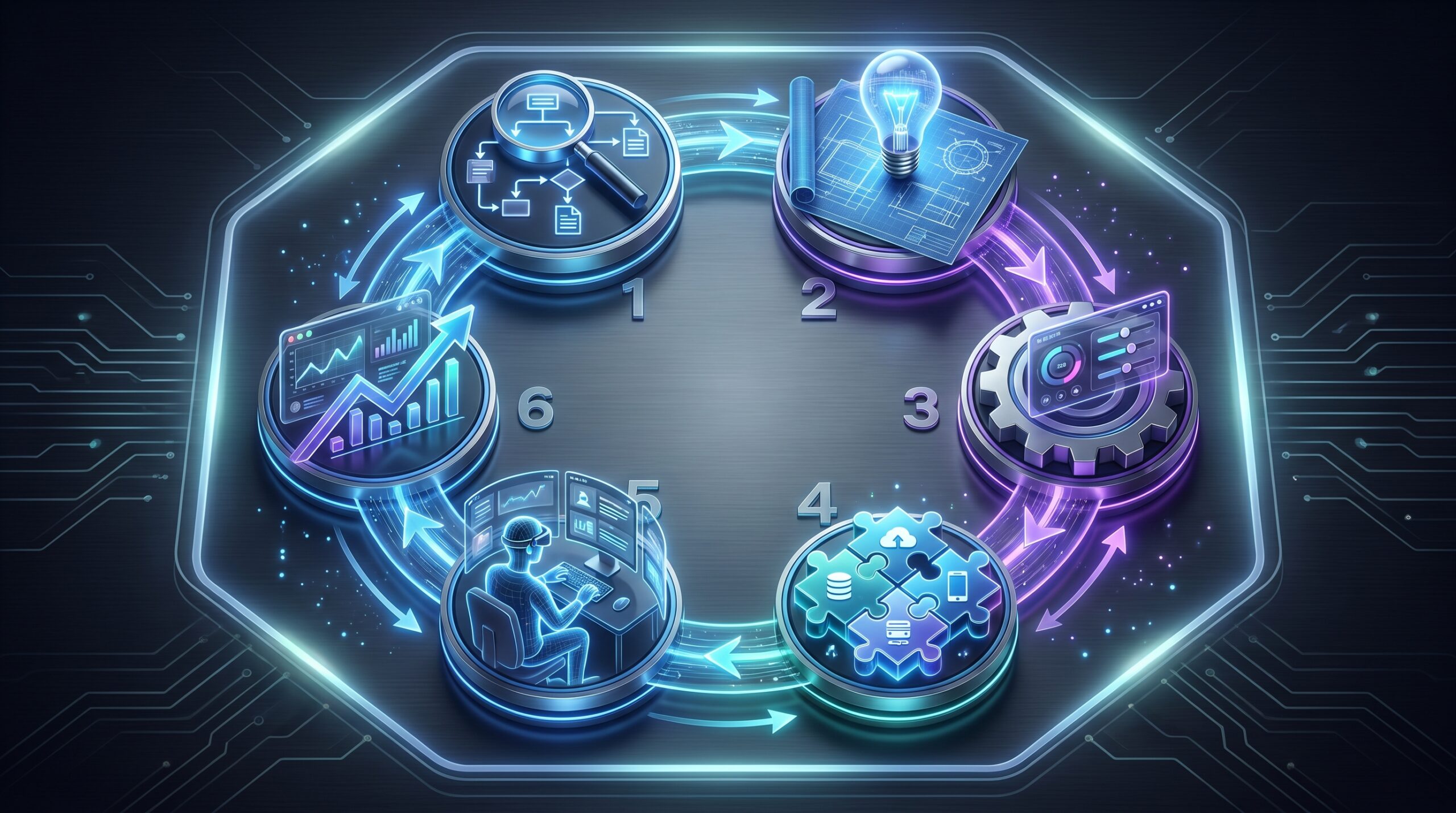
The lifecycle of a workflow in software follows a clear sequence:
- Process Mapping: The first step is to document the current process, including all tasks, decision points, responsible parties, and data inputs. This is often done using flowcharts or the software’s visual designer.
- Workflow Design: Using a drag-and-drop interface, you build the digital version of the process. This involves creating forms for data entry, setting up task assignments (e.g., “Assign to the manager of the requester’s department”), and defining conditional rules (e.g., “If invoice amount > $10,000, route to CFO for approval”).
- Rule-based Automation: The software’s engine executes the workflow based on the defined rules. It automatically moves the work item (e.g., a purchase request) from one step to the next, sending notifications and updating statuses without human intervention.
- Task Assignment and Execution: Assigned users receive tasks in their inbox or via email/Slack. They complete their part, such as reviewing a document or providing approval, which triggers the next step in the sequence.
- Monitoring and Reporting: Dashboard tools provide real-time visibility into the workflow’s performance, showing metrics like average completion time, bottlenecks, and backlog.
- Iteration and Optimization: Based on the data, you can identify inefficiencies and refine the workflow design to improve speed and accuracy continuously.
Key Features and Functionalities of Modern Workflow Software
When evaluating workflow software examples, look for these essential features:
- Visual Form Builder: Allows you to create custom digital forms (for requests, applications, etc.) without coding.
- Drag-and-Drop Workflow Designer: An intuitive interface for building the process flow by connecting steps and rules.
- Conditional Logic: The ability to create if/then/else paths so the workflow can adapt based on data (e.g., different approval paths for different cost centers).
- Approval Hierarchies: Support for multi-level approvals based on dynamic factors like amount, department, or project.
- Integration Capabilities (APIs/Connectors): Pre-built connectors or API access to link with critical apps like Salesforce, Slack, Google Workspace, and SAP.
- Real-time Notifications: Alerts via email, mobile push, or team chat to keep participants informed.
- Analytics Dashboards: Visual reports on cycle times, workload distribution, and process compliance.
- Mobile Accessibility: A fully functional mobile app so users can action tasks and monitor processes on the go.
- Document Management: Version control, e-signature integration, and secure storage for files associated with the workflow.
Workflow Automation vs. Robotic Process Automation (RPA) in Workflow Software
It’s crucial to distinguish between these two automation approaches, as they serve different purposes and can be combined.
Workflow Automation focuses on orchestrating the flow of tasks and information between people and systems. It answers the question, “What happens next, and who does it?” It is process-centric. For example, an invoice approval workflow routes the invoice from the receptionist to the approver to the accounting system.
Robotic Process Automation (RPA), in contrast, focuses on automating the individual, repetitive tasks within a single application or across a few applications. It answers the question, “How is this specific task done?” It is task-centric. An RPA bot might be programmed to log into an email account, download an invoice attachment, and input its data into an ERP system.
The Synergy: They are complementary. A workflow automation platform can manage the overall invoice approval process. When it reaches the step “Enter invoice data into ERP,” it can trigger an RPA bot to perform that specific, repetitive data entry task, then resume the human-centric approval steps. Leading platforms are increasingly blending these capabilities. For more information on such advanced tools, consider exploring best free AI workflow automation tools.
Real-World Workflow Software Examples and Use Cases
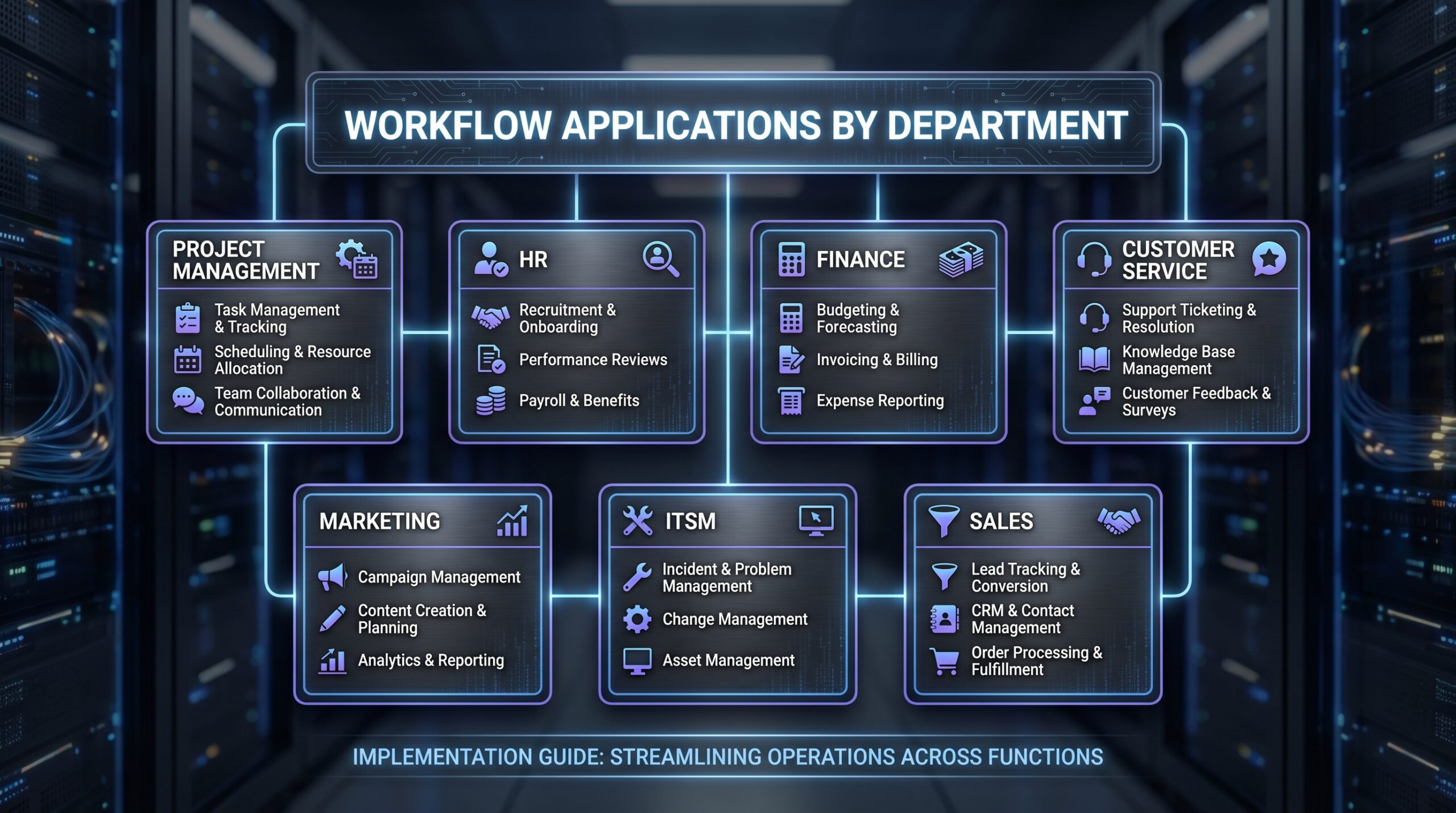
Project Management Workflow Software Examples
Tools: Jira, Asana, Trello, Monday.com, Wrike.
These tools manage the workflow of projects from initiation to completion. In Asana, you can create a template for a “Website Launch” project. The workflow automatically creates tasks for copywriting, design, development, and QA. Rules can be set so that the “Design” task is only assigned after the “Copy Approval” task is marked complete. Monday.com uses column-based “status” changes to trigger automations, like notifying the client when a project moves to “Review” phase. Their strength is in visualizing project timelines and dependencies.
HR & Employee Onboarding Workflow Software Examples
Tools: BambooHR, Workday, Sapling, Namely.
HR workflows automate the employee lifecycle. When a new hire is approved in BambooHR, it can automatically trigger an onboarding workflow. This workflow might sequentially: assign IT to set up hardware and software accounts, alert the facilities manager to prepare a desk, assign HR to conduct orientation, and remind the manager to schedule meet-and-greets. Each step has deadlines and dependencies, ensuring a smooth, consistent experience for every new employee and reducing the administrative burden on HR.
Financial & Accounting Workflow Software Examples
Tools: Sage Intacct, QuickBooks Advanced, Xero with add-ons, Bill.com.
These tools streamline core financial processes. A common example is the accounts payable workflow. An invoice arrives via email, and software like Bill.com extracts the data using OCR. The workflow then routes it based on rules: invoices under $1,000 go to a department manager, those between $1,000 and $5,000 go to a senior manager, and larger invoices go to the CFO. Once approved, the workflow automatically schedules the payment in the banking system and posts the entry to the general ledger, ensuring accuracy and audit compliance.
Customer Service & Help Desk Workflow Software Examples
Tools: Zendesk, Freshdesk, Salesforce Service Cloud, HubSpot Service Hub.
Customer service workflows ensure tickets are handled efficiently. In Zendesk, a rule can be created: “If a ticket comes from a ‘Gold’ tier customer, set priority to ‘Urgent’ and assign to the ‘Senior Support’ group.” Another workflow can automatically suggest relevant knowledge base articles to the agent based on the ticket’s keywords. Escalation workflows can notify a manager if a ticket remains unresolved for more than 4 hours. This automation leads to faster resolution times and higher customer satisfaction scores (CSAT).
Marketing Campaign Approval Workflow Software Examples
Tools: Workfront (now part of Adobe), Asana, Trello, Wrike.
Marketing teams use workflows to manage the complex process of launching campaigns. A workflow in Workfront might start with a campaign brief. Once approved, it automatically triggers task creation for design, content writing, and legal review. The legal review task might have a rule: “If the campaign mentions a specific competitor, route to the external legal team; otherwise, route to internal counsel.” Final assets are automatically moved to a “Ready for Publishing” stage, triggering a notification to the marketing operations team. This prevents bottlenecks and ensures brand compliance.
IT Service Management (ITSM) Workflow Software Examples
Tools: ServiceNow, Jira Service Management, ManageEngine ServiceDesk Plus, Freshservice.
ITSM workflows standardize how IT services are delivered. An “Employee Laptop Request” in ServiceNow can automatically check the employee’s department and role against a catalog, present appropriate options, and route the request for approval to their manager. Upon approval, the workflow assigns the task to the IT procurement team and simultaneously creates a subtask for the IT support team to configure the device upon arrival. This end-to-end automation significantly reduces the resolution time for employee requests.
Low-Code/No-Code Workflow Software Examples for Business Users
Tools: Zapier, Microsoft Power Automate, Google AppSheet, Airtable.
These platforms empower non-technical users to build powerful integrations and automations. A sales manager could use Zapier to create a “New Lead” workflow: “When a new row is added to a Google Sheet (from a web form), automatically create a contact in Salesforce, send a personalized email via Gmail, and post a message in a dedicated Slack channel.” Microsoft Power Automate offers similar capabilities deep within the Microsoft 365 ecosystem, like automatically saving email attachments to a specific SharePoint folder and notifying the team. These tools democratize automation, aligning with broader trends in workflow automation platforms.
Comparing Workflow Software Examples: Alternatives & Best-Fit Solutions
Workflow Software vs. Project Management Software: Key Differences
While there is overlap, the core difference lies in focus. Project management software is task-oriented. It answers “What are all the things we need to do to complete this project?” It excels at managing timelines, resources, and deliverables for a temporary initiative with a defined end date.
Workflow software is process-oriented. It answers “What are the sequential steps that must happen every time we perform this recurring business function?” It focuses on consistency, compliance, and efficiency for ongoing, repeatable operations like employee onboarding or invoice processing.
Many modern tools blend these capabilities. Asana and Monday.com have strong workflow features, while BPM platforms like Kissflow can manage project-like initiatives. The choice depends on whether your primary need is managing a unique project or optimizing a standard operating procedure.
Choosing Between General-Purpose and Niche Workflow Software Examples
This is a fundamental trade-off between flexibility and depth.
General-Purpose Software (e.g., Monday.com, Zapier):
- Pros: Highly flexible, can be adapted to almost any process; single platform for multiple departments; often easier to learn.
- Cons: May lack deep, specialized features needed for complex functions (e.g., IT change management); requires more configuration.
- Best for: SMBs, departments with diverse needs, or companies seeking a unified automation platform.
Niche/Specialized Software (e.g., ServiceNow for IT, BambooHR for HR):
- Pros: Built with industry best practices in mind; includes specialized data fields and reporting; faster implementation for its specific purpose.
- Cons: Creates silos if used in isolation; can be expensive; not suitable for processes outside its domain.
- Best for: Large enterprises, regulated industries, or departments with highly complex, specific requirements.
Comparison of Workflow Software Categories
| Category | Primary Focus | Typical Use Cases | Example Tools | Complexity |
|---|---|---|---|---|
| BPM Suites | End-to-end process optimization and analytics | Complex, cross-functional processes like procurement, compliance reporting | Appian, Pega, Kissflow | High |
| Project Management | Task coordination within a project with a defined timeline | Software development, marketing campaigns, event planning | Asana, Jira, Monday.com | Medium |
| RPA Tools | Automating repetitive, rule-based desktop tasks | Data entry, report generation, system migration | UiPath, Automation Anywhere, Blue Prism | Medium-High |
| Integration Platforms (iPaaS) | Connecting cloud applications to automate data flow | Syncing leads from a form to a CRM, posting social media updates | Zapier, Make (Integromat), Power Automate | Low-Medium |
| Niche/Specialized | Optimizing processes within a specific business function | IT service desk, HR onboarding, customer support | ServiceNow, BambooHR, Zendesk | Varies |
Feature Comparison: Popular Workflow Software Examples
| Software | Key Strengths | Integrations | User Friendliness | Ideal For | Typical Pricing Model |
|---|---|---|---|---|---|
| Asana | Intuitive project & task management, strong visualization (Boards, Timeline) | 200+ including Slack, Google Drive, Salesforce | Very High | Marketing, PMOs, cross-functional teams | Per user, per month (Free tier available) |
| Kissflow | Pure-play BPM, strong forms and reporting, good for non-technical users | Deep Google Workspace, REST API | High | Business users automating departmental processes | Per user, per month (volume discounts) |
| Zapier | Vast ecosystem of app connections (5000+), extremely simple “if this then that” logic | Unmatched (5000+ apps) | High | Automating tasks between web apps for individuals & teams | Per task/month (Free tier available) |
| Microsoft Power Automate | Deep integration with Microsoft 365/Azure, includes RPA capabilities, strong security | Excellent for Microsoft ecosystem, good for others via connectors | Medium | Organizations heavily invested in Microsoft products | Per user/per flow plans (Part of M365 suites) |
Tools, Vendors, and Implementation Paths for Workflow Software Examples
Top Workflow Software Vendors and Their Offerings
- monday.com: A Work Operating System (WorkOS) known for its highly customizable boards and visual workflow automation. Strong for project management, sales CRMs, and marketing pipelines.
- Asana: A leader in project and work management with robust rules-based automation to streamline task assignment and status changes.
- Jira (Atlassian): The industry standard for software development teams using Agile methodologies, with powerful workflow engines for issue and bug tracking.
- Smartsheet: A spreadsheet-like interface that is powerful for managing complex workflows, resources, and portfolios, favored by operations and IT teams.
- ServiceNow: The dominant player in enterprise IT Service Management (ITSM), with expansive workflows for IT, customer service, and HR service delivery.
- Zapier: The leading integration platform-as-a-service (iPaaS) that allows users to connect thousands of apps and create automated “Zaps” without code.
- Microsoft Power Automate: A versatile tool deeply embedded in the Microsoft ecosystem, offering cloud flows, desktop flows (RPA), and business process flows.
- Kissflow: A user-friendly, low-code platform focused specifically on Business Process Management (BPM) for business users outside of IT.
Selecting the Right Workflow Software: Key Trade-offs to Consider
Before selecting a tool, weigh these critical factors:
- Scalability: Can the software handle 10x the number of users or processes? Check for API rate limits and performance benchmarks.
- Integration Capabilities: Does it have pre-built connectors for your core apps (Slack, Salesforce, NetSuite)? Evaluate the ease of using its API for custom connections.
- Ease of Use vs. Power: Simpler tools are easier to adopt but may hit a ceiling. Powerful tools offer more control but have a steeper learning curve. Aim for the lowest complexity that meets your needs.
- Customization: Can you create custom fields, reports, and dashboards? Or are you locked into the vendor’s predefined structures?
- Reporting and Analytics: Built-in dashboards are essential for measuring ROI. Can you track cycle times, bottlenecks, and user workload?
- Pricing Model: Understand if pricing is per user, per feature tier, or based on usage (e.g., number of “Zaps” or tasks). Watch for hidden costs like implementation fees or charges for premium support.
Implementation Best Practices for Workflow Software Examples
A successful rollout follows a structured path:
- Define Clear Goals: Start with a specific, measurable goal. “Reduce invoice processing time from 10 days to 3 days” is better than “improve accounting efficiency.”
- Map the Current Process (As-Is): Document the existing process in detail with input from all stakeholders. Identify pain points, bottlenecks, and redundancies.
- Design the Future Process (To-Be): Redesign the process to eliminate the identified inefficiencies before you start configuring the software. Automate a good process, not a bad one.
- Select a Pilot Process: Choose a relatively simple, contained process for your first implementation. This limits risk and allows for quick wins that build momentum.
- Configure and Test: Build the workflow in the software, involving a small group of end-users in testing. Test all possible paths and edge cases.
- Train Users: Provide hands-on training focused on how the new workflow makes users’ jobs easier, not just on how to click buttons.
- Phased Rollout: Launch the pilot, gather feedback, and make adjustments. Then, gradually roll out to other teams or processes.
- Monitor and Optimize: Continuously use the software’s analytics to identify new bottlenecks and opportunities for further optimization.
Costs, ROI, and Monetization Upside of Workflow Software Examples
Understanding the Investment: Pricing Models for Workflow Software
Pricing is typically subscription-based (SaaS), with several common models:
- Per User, Per Month: The most common model. Prices range from $10/user/month for basic plans to $50+/user/month for enterprise tiers with advanced features. Volume discounts are standard.
- Tiered Feature-Based: Different pricing tiers unlock different capabilities (e.g., more automation, advanced reporting, premium support).
- Usage-Based: Common for integration tools like Zapier, where you pay based on the number of automated tasks (“Zaps”) executed per month.
- Platform/Flat-Rate: Some vendors charge a flat monthly fee for unlimited users within a certain usage cap, ideal for large, company-wide deployments.
Beyond software subscription costs, factor in implementation effort (internal or consultant-led), potential integration costs, and ongoing training and admin time.
Calculating ROI: How Workflow Software Drives Revenue and Savings
ROI is calculated by quantifying the benefits against the total cost of ownership. Key benefit areas include:
- Reduced Labor Costs: Calculate the time saved per process instance. Example: An manual expense report takes 30 minutes of employee and manager time. An automated version takes 5 minutes. Saving 25 minutes per report at an average fully-loaded labor rate of $50/hour equals ~$20 saved per report. Multiply by the annual volume.
- Faster Cycle Times: Reduced process time can lead to revenue acceleration (e.g., faster sales quote generation) or cost avoidance (e.g., avoiding late payment fees by paying invoices faster).
- Error Reduction: Quantify the cost of errors in the manual process (e.g., incorrect payments, compliance fines, rework). Automation drastically reduces these.
- Improved Compliance: Avoidance of regulatory fines and reduced audit preparation time are significant financial benefits.
Example ROI Calculation: A company processes 100 invoices monthly manually, taking 15 days on average. Software costs $5,000/year. Automation reduces processing to 5 days and saves 20 minutes of labor per invoice. Labor Savings: 100 invoices 12 months (20/60 hours) $50/hour = $20,000. Cost Avoidance (early payment discounts): Estimated $5,000. Total Benefits: $25,000. ROI: (($25,000 – $5,000) / $5,000) 100 = 400% ROI.
Monetization Opportunities with Advanced Workflow Software
Beyond cost savings, workflow software creates direct monetization opportunities:
- Faster Time-to-Market: Streamlined product development and launch workflows allow you to release new products or features ahead of competitors, capturing market share.
- Enhanced Customer Service: Automated and efficient customer onboarding and support workflows improve retention and customer lifetime value (LTV). Satisfied customers are more likely to expand their purchases.
- New Service Offerings: You can productize your internal expertise. For example, a marketing agency could use a workflow platform to offer a standardized, scalable “campaign in a box” service to clients.
- Data-Driven Insights: The data captured by workflow analytics can reveal unmet customer needs or operational inefficiencies in your industry, leading to ideas for new products or consulting services.
Callout: The AI Advantage for Workflow Automation
Modern workflow software increasingly integrates AI capabilities. This isn’t just about automating simple tasks; it’s about adding intelligence to your processes. AI can:
- Predict Bottlenecks: Analyze historical data to forecast where workflows might slow down.
- Suggest Optimizations: Recommend changes to workflow paths or task assignments based on performance.
- Automate Data Extraction: Use OCR and natural language processing to pull key information from documents (e.g., invoices, contracts).
- Route Requests Intelligently: Direct customer inquiries or IT tickets to the most appropriate agent or department based on content.
Embracing AI in your workflows is crucial for staying competitive in 2026, aligning with discussions on the state of AI in 2026.
Risks, Pitfalls, and Myths vs. Facts About Workflow Software Examples
Common Risks and Challenges in Workflow Software Implementation
- Resistance to Change: Employees may be skeptical or fearful of automation. Mitigation requires clear communication, involving them in the design process, and emphasizing how the tool eliminates tedious work.
- Poor Process Definition: Automating a broken, inefficient process simply makes things go wrong faster. Always optimize the process first, then automate.
- Scope Creep: Trying to build an overly complex workflow for every possible scenario from the start. Start simple, get a win, and then iterate.
- Integration Complexity: Connecting the new workflow software to legacy systems can be technically challenging and expensive. Conduct a thorough integration assessment during the selection phase.
- Data Security and Compliance: Storing sensitive data in a new cloud platform raises security questions. Ensure the vendor complies with relevant standards (SOC 2, ISO 27001, GDPR) and offers robust access controls.
- Vendor Lock-in: Once a complex workflow is built, it can be difficult and costly to migrate to another platform. Choose vendors with strong data portability and API access.
What Most People Get Wrong About Workflow Software Benefits
A common misconception is that the primary goal is to replace people. In reality, the goal is to augment human effort by removing low-value, repetitive tasks, freeing up employees for strategic, creative, and customer-facing work that software cannot do. It’s a tool for job enhancement, not elimination, which highlights a common theme when discussing which 3 jobs will survive AI. Another mistake is underestimating the need for ongoing management. Workflows are not “set and forget”; they require monitoring and tweaking as business needs evolve. Finally, many expect immediate perfection. Iterative improvement is the name of the game.
Myths vs. Facts: Demystifying Workflow Software Capabilities
Myth: Workflow software is only for large enterprises with big IT departments.
Fact: The rise of low-code/no-code platforms like Zapier and Airtable has made powerful workflow automation accessible to solo entrepreneurs and small teams with no technical skills.
Myth: Implementing workflow software will lead to massive job losses.
Fact: While it automates tasks, it primarily shifts job roles away from administrative work towards more rewarding, higher-value activities like analysis, customer relationship management, and innovation. It’s a tool for job enhancement, not elimination.
Myth: If you build it, they will come (high adoption is automatic).
Fact: User adoption is the single biggest determinant of success. It requires proactive change management, excellent training, and demonstrating clear value to the end-user.
Myth: All workflow software is essentially the same.
Fact: The capabilities, target users, and complexity vary dramatically, from simple task automators to sophisticated BPM suites capable of running entire business units. The choice is critical.
FAQ
What is the best software to create a workflow?
The ‘best’ workflow software depends on your specific needs. For complex business processes, BPM suites like Kissflow or Process Street are excellent. For project management, Asana or Monday.com are top choices. For integration and simple automation across apps, Zapier or Microsoft Power Automate excel. Consider factors like ease of use, integration capabilities, scalability, and pricing when making your decision.
What is a workflow software?
Workflow software is a tool designed to automate, manage, and optimize business processes by defining a sequence of tasks, rules, and steps. It helps streamline operations, assign responsibilities, track progress, and improve efficiency by reducing manual intervention and human error, ensuring processes are executed consistently and effectively.
What are some examples of workflow tools?
Examples of workflow tools span various categories. Project Management tools include Jira, Asana, and Trello. Business Process Management (BPM) platforms feature solutions like Kissflow and Process Street. Integration platforms like Zapier and Microsoft Power Automate create workflows between different applications. Other notable examples are Smartsheet for work management and Zendesk for customer service workflows.
Can Chatgpt create workflows?
ChatGPT cannot directly ̵ ड्राइवर to execute workflows in the operational sense. However, it can assist significantly in the workflow creation process by generating ideas for process steps, drafting workflow descriptions, writing simple automation scripts (e.g., for Zapier or Power Automate), or suggesting improvements to existing workflows based on best practices. It acts as a powerful assistant for design and documentation, not as an execution engine.
Glossary of Workflow Software Terms
Essential Terminology for Workflow Software Examples
- API (Application Programming Interface): A set of rules that allows different software applications to communicate with each other. Workflow software uses APIs to connect with other systems.
- BPM (Business Process Management): A discipline for modeling, automating, executing, controlling, measuring, and optimizing business activity flows to achieve organizational goals.
- Conditional Logic: Programming rules (typically “if X, then Y”) that determine the path a workflow instance takes based on data inputs.
- Integration: The process of connecting workflow software with other applications (e.g., CRM, email) to allow seamless data exchange.
- Low-Code/No-Code Platform: A development environment that allows users to create applications with little or no hand-coding, using visual tools and drag-and-drop interfaces. Essential for citizen developers.
- Process Orchestration: The coordination of multiple automated tasks, often across different systems, to execute a complete business process.
- RPA (Robotic Process Automation): Technology that uses software “robots” to mimic human actions for repetitive, rule-based tasks within applications.
- SLA (Service Level Agreement): A commitment between a service provider and a client on metrics like response time and resolution time. Workflows can be designed to enforce SLAs.
- Trigger: An event that initiates a workflow, such as receiving an email, a form submission, or a change in a database record.
References: Cited Sources for Workflow Software Examples
Further Reading and Research on Workflow Software
- Gartner, “Magic Quadrant for Enterprise Low-Code Application Platforms” (2025)
- Forrester, “The Forrester Wave™: Low-Code Development Platforms For AD&D Professionals” (2025)
- Workflow Management Coalition (WfMC): Standards and definitions for workflow terminology.
- Harvard Business Review, “The Business Case for Automation” (2024)
- McKinsey & Company, “The Next Normal: The Future of Operations” (2025)
- Vendor-specific documentation and case studies from ServiceNow, Asana, monday.com, Zapier, and Microsoft.